



You shipped a release where every feature passed its functional tests. Login worked. Forms submitted. Reports loaded. Then a penetration tester logged in as a basic viewer and deleted an admin-level resource by replaying a single API call. The feature "worked" — it just worked for everyone, regardless of their privilege level. This is not a hypothetical edge case. Broken access control has held the top position on the OWASP Top 10 list of web application security risks [1]. If your test strategy validates what the system does but not who is allowed to do it, you are likely shipping authorization defects into production. This article gives you a step-by-step workflow for testing access control — from building an access matrix to integrating checks into your CI/CD pipeline.
What Is Access Control?
Access control is the set of rules and mechanisms that determine which users can perform which actions on which resources within a system. It sits at the intersection of authentication (proving who you are) and authorization (deciding what you are allowed to do). Your QA responsibility begins where authentication ends: once a user's identity is confirmed, does the system correctly enforce the boundaries of what that identity is permitted to access?
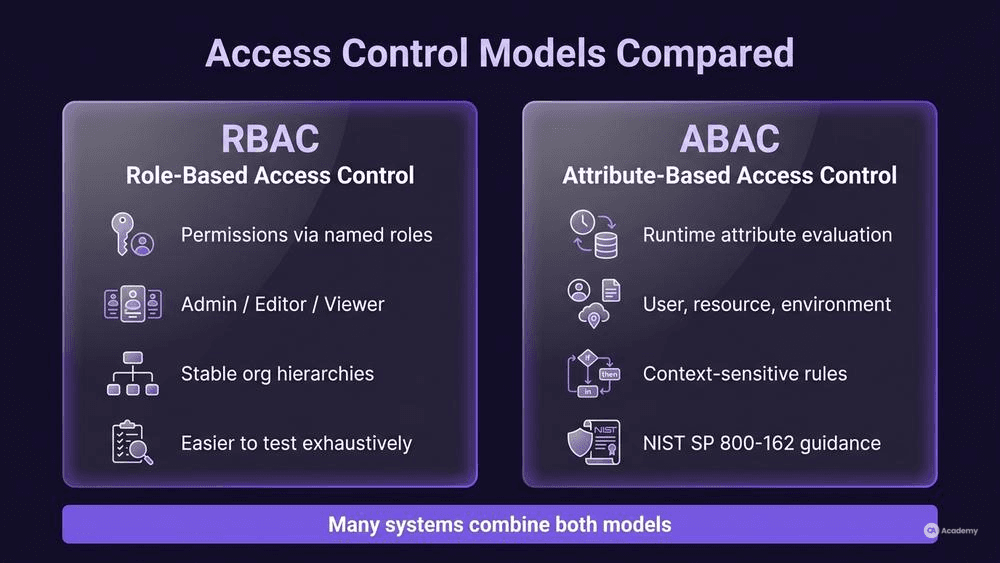
Two dominant models shape how most modern applications implement these boundaries:
- RBAC model (Role-Based Access Control): Permission sets are assigned to named roles (Admin, Editor, Viewer), and users inherit permissions through role membership. This model works well when organizational hierarchies are stable and role definitions are clear-cut.
- ABAC attributes (Attribute-Based Access Control): Authorization decisions are evaluated at runtime based on user attributes, resource attributes, and environmental conditions (time of day, IP range, department). NIST SP 800-162 provides detailed guidance on ABAC definition and implementation [2]. ABAC tends to be more flexible but also harder to test exhaustively because the number of attribute combinations can grow rapidly.
Many production systems use a hybrid approach — RBAC for coarse-grained control with ABAC policies layered on top for context-sensitive rules. As a tester, your first job is to identify which model (or combination) your application uses so you can scope your test strategy accordingly.
Why It Matters for QA
Functional testing typically validates that a feature works correctly for a user who is supposed to use it. Access control testing validates that the feature is unreachable — or behaves differently — for users who are not. This distinction matters for several reasons:
Security risk is direct. Broken access control consistently ranks among the most prevalent web application security risks according to OWASP [1]. Unlike injection attacks that often require specialized payloads, access control flaws can frequently be exploited by simply changing a URL parameter, modifying a request header, or replaying an API call with a different session token.
Compliance drives requirements. Regulated industries (healthcare, finance, government) often mandate documented evidence that authorization controls have been tested against defined permission sets. Without a structured access control testing approach, your team may not be able to produce this evidence during audits.
Defects hide in plain sight. A user who can view a resource they should not see will rarely report it. Unlike a crashed page or a broken form, unauthorized access often produces no visible error — the system simply returns data it should have withheld. These defects tend to persist until a security review or a breach surfaces them.
How to Build and Execute Access Control Tests
Prerequisites and Setup
Before you write a single test case, you need three things:
- A complete role inventory. List every role or user type the system recognizes, including service accounts, API keys, and anonymous/unauthenticated users. Do not rely solely on documentation — cross-reference with the actual identity provider or user management interface.
- A resource and action inventory. Catalog every endpoint, page, data entity, and operation the system exposes. For APIs, your OpenAPI/Swagger spec is a practical starting point. For UIs, map every navigation path and form action.
- An access matrix. This is the core artifact that maps roles to resources and actions. For most systems, it is the most important single document for authorization testing. Without it, you are testing against assumptions rather than specifications.
A practical access matrix looks like this:
Resource / Action | Admin | Editor | Viewer | Anonymous |
|---|---|---|---|---|
GET /users | ✅ | ✅ | ✅ | ❌ |
POST /users | ✅ | ❌ | ❌ | ❌ |
PUT /users/{id} | ✅ | ✅ (own) | ❌ | ❌ |
DELETE /users/{id} | ✅ | ❌ | ❌ | ❌ |
GET /reports/financial | ✅ | ❌ | ❌ | ❌ |
Every cell in this matrix becomes a test case. The ✅ cells are positive tests (confirm access works). The ❌ cells are negative tests (confirm access is denied). The conditional cells (e.g., "own" data only) become boundary tests.
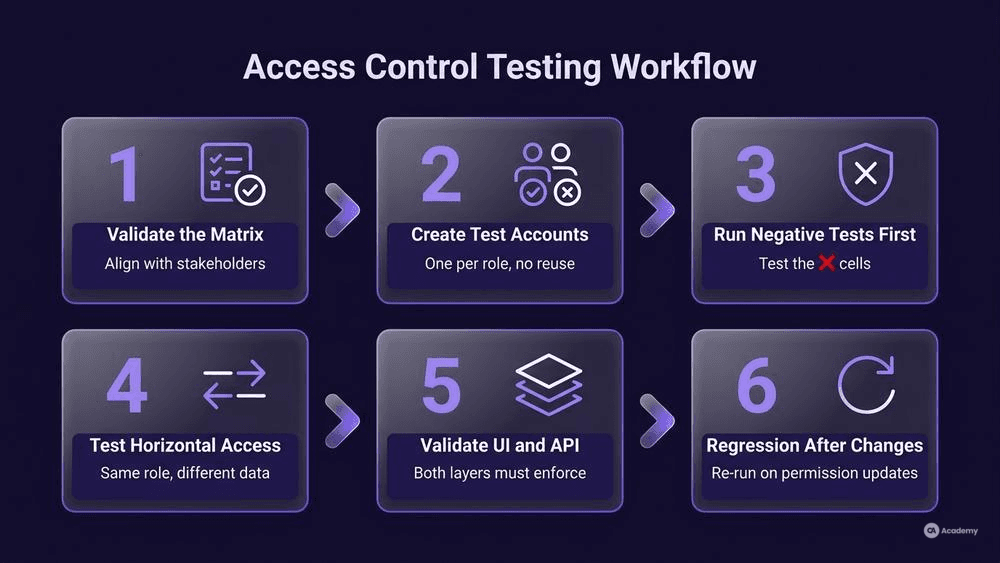
Step 1: Validate the Matrix with Stakeholders
Do not assume the matrix is correct because a product owner drafted it. Walk through it with the development team, the security lead, and the business stakeholder. Discrepancies at this stage are common and far cheaper to resolve than misaligned test results later.
Step 2: Create Test Accounts for Every Role
Set up dedicated test accounts for each role in your matrix. Avoid reusing accounts or manually toggling roles between test runs — this introduces state leakage and makes results unreliable. If your system supports ABAC attributes, create account variants that differ by department, region, or other relevant attributes.
Step 3: Execute Negative Tests First
Counterintuitively, start with the ❌ cells. Positive access (authorized user can do the thing) is usually well-covered by your existing functional tests. The gaps tend to live in the negative cases — can an Editor delete a user? Can a Viewer access the financial reports endpoint directly via URL?
For API-level testing, this often means:
# Attempt a restricted action with an unauthorized role's token
curl -X DELETE https://api.example.com/users/42 \
  -H "Authorization: Bearer <editor_token>"

# Expected: 403 Forbidden
# Fail condition: 200 OK or 204 No Content
Step 4: Test Horizontal Access (Same Role, Different Data)
Vertical escalation (Viewer acting as Admin) gets the most attention, but horizontal escalation is easy to overlook and typically represents a high-severity risk category. This is where a user with legitimate access to their own data accesses another user's data at the same privilege level.
Test by authenticating as User A and attempting to access User B's resources by manipulating identifiers (IDs, UUIDs, slugs) in URLs, request bodies, or query parameters.
Step 5: Validate at Both UI and API Layers
A common defect pattern: the UI hides a button from unauthorized users, but the underlying API endpoint accepts the request without checking permissions. In most applications, it is advisable to validate at the API and data layer rather than relying on UI-level enforcement alone, since UI restrictions can be bypassed by any client that constructs direct HTTP requests.
Step 6: Regression-Test After Permission Changes
When roles or permission sets change, re-execute the full matrix. Access control defects frequently appear when new features are added and permission rules are not updated to cover them.
Best Practices for Authorization Testing
Adopt least-privilege as your baseline assumption. When building or reviewing a permission model, the most resilient approach is to start each role with zero permissions and explicitly grant only what it needs. If a permission is not documented in the matrix, treat its presence as a defect.
Automate the access matrix. Convert your matrix into parameterized test cases that run on every build. A matrix with 5 roles and 20 endpoints generates 100 test cases — this is tedious to run manually but trivial to automate.
Test token and session handling. Expired tokens, revoked sessions, and concurrent logins are access control boundaries that often behave differently than documented. Include tests for what happens when a user's role is changed mid-session.
Include unauthenticated access. Every endpoint in your matrix should have an "Anonymous" column. It is easy to forget that some endpoints may be reachable without any authentication token at all.
Document expected error responses. Define whether unauthorized access should return 401 (Unauthenticated), 403 (Forbidden), or 404 (Not Found — sometimes preferable to avoid revealing resource existence). Inconsistent error responses can leak information about your system's structure.
What NOT to Do
Understanding common anti-patterns is as important as following best practices. These mistakes surface repeatedly in access control testing:
- Do not test only at the UI layer. Hiding a menu item is not access control. If the API behind it responds to unauthorized requests, you have a defect regardless of what the UI shows.
- Do not assume "admin can do everything" without verifying. Even admin accounts should have tested boundaries. Super-admin backdoors that bypass all checks are themselves a security risk that warrants documentation and explicit acceptance.
- Do not skip testing after role or permission model changes. A new feature that adds a resource without updating the permission model is one of the most common sources of access control defects.
- Do not rely on penetration testing as your only access control validation. Pen tests are valuable but typically happen late in the cycle and sample a subset of scenarios. Your QA access matrix should provide systematic coverage that pen testing supplements, not replaces.
- Do not hardcode role names in test logic without abstraction. When role names change (and they do), every test breaks. Use a configuration layer or data-driven approach that maps role identifiers to test credentials.
- Do not conflate authentication failures with authorization failures in your defect reports. A 401 (who are you?) and a 403 (you cannot do this) indicate different root causes and require different fixes. Misclassifying them slows down triage.
Tools Comparison
Tool | Primary Use | Access Control Relevance | License |
|---|---|---|---|
OWASP ZAP | DAST (Dynamic Application Security Testing) | Automated scanning for broken access control patterns, forced browsing, and parameter tampering | Open Source |
Burp Suite | Web security testing | Manual and automated testing of authorization bypasses, session handling, and privilege escalation | Community (free) / Professional (paid) |
Postman | API testing | Collection-based testing of API endpoints across multiple role tokens; automatable via Newman CLI | Free / Paid tiers |
Cypress / Playwright | E2E browser testing | UI-level access control validation; can intercept and modify API calls for hybrid testing | Open Source |
How to choose: For teams starting with access control testing, Postman or a similar API client offers the fastest path to validating your access matrix at the API layer. As your practice matures, layer in DAST tools like OWASP ZAP for automated scanning. Burp Suite is particularly valuable when you need to manually explore complex authorization flows or session edge cases.
Real-World Example
⚠️ Disclaimer: The following scenario is an illustrative example based on typical industry patterns. The specific metrics are hypothetical estimates designed to demonstrate realistic outcomes, not measured data from a documented project. They should not be cited as factual benchmarks.
Context
A mid-size SaaS company operating a multi-tenant project management platform with four defined roles: Organization Admin, Project Manager, Team Member, and External Collaborator. The platform had approximately 60 API endpoints and a corresponding web UI. The team's existing test suite covered functional correctness thoroughly but had no systematic authorization testing.
Challenge
During a customer-initiated security review, the client discovered that an External Collaborator could access invoice data belonging to other organizations by modifying the organization ID in API requests. This was a horizontal escalation defect that the functional test suite had no mechanism to detect, since the endpoint "worked correctly" — it returned valid invoice data regardless of who requested it.
Solution
The QA team implemented a structured access control testing approach:
- Built a complete access matrix covering all 60 endpoints across all 4 roles plus an unauthenticated user profile (300 test scenarios).
- Created dedicated test accounts for each role, including accounts in separate tenant organizations to cover horizontal access.
- Automated the matrix as parameterized API tests in Postman/Newman, integrated into the CI pipeline.
- Added OWASP ZAP scans as a nightly job to catch configuration regressions.
Results
- Identified 12 previously undetected authorization defects in the first full matrix execution, including 3 critical horizontal escalation issues.
- Reduced the average time to detect access control regressions from the next pen test cycle (typically quarterly) to the next CI build (typically within hours).
- Estimated a 70% reduction in authorization-related defects reaching staging environments after three sprint cycles.
- The total test execution time for the full access matrix was approximately 8 minutes per CI run.
Key Takeaways
- Systematic coverage through the access matrix revealed defects that years of functional testing had missed.
- Horizontal access (same role, different tenant/data) was the highest-severity defect category, not vertical escalation.
- Automating the matrix made regression testing practical — without automation, 300 scenarios would not have been executed regularly.