



Your team runs hundreds of test cases every sprint. Results live in spreadsheets, defect links get lost in chat threads, and nobody can confidently answer a simple question: "Are we ready to release?" This is the reality for QA teams that have outgrown their ad-hoc tracking but have not yet adopted a proper test management tool. The right platform brings test cases, execution data, defects, and requirements into a single source of truth. This article walks you through what a test management tool actually does, how to evaluate and roll one out, and what traps to avoid along the way.
What Is a Test Management Tool?
A test management tool is a platform that centralizes the planning, design, execution, and reporting of software testing activities. It replaces scattered documents and disconnected trackers with an integrated workspace where—ideally—test cases, execution runs, defect records, and requirement links coexist.
The concept is grounded in international standards. ISO/IEC/IEEE 29119-3 defines the documentation artifacts that a well-structured testing process should produce, including test plans, test case specifications, and test status reports [1]. A test management tool is the practical vehicle that makes those artifacts manageable at scale.
Why It Matters for QA
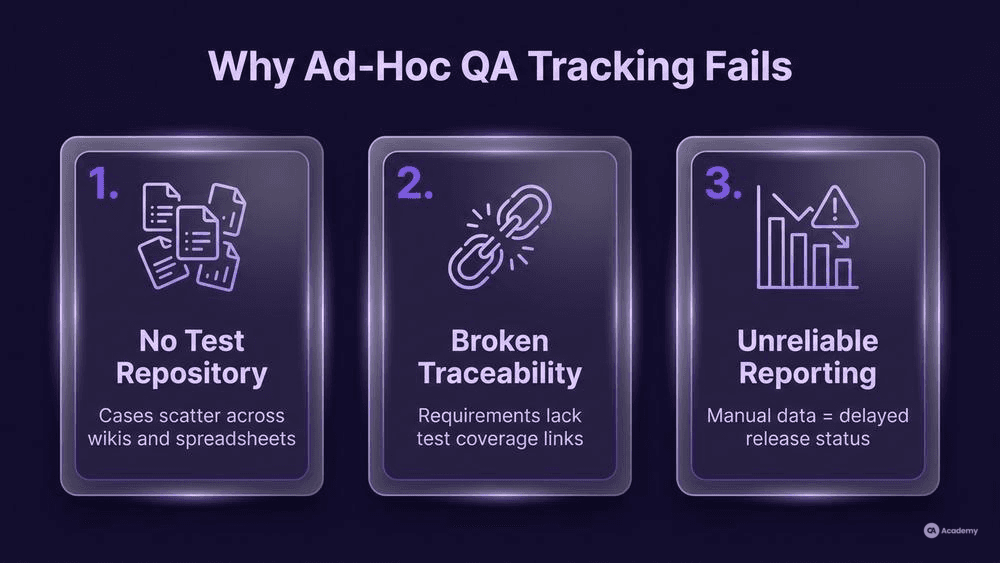
Without a centralized platform, three problems tend to surface quickly:
- No single test case repository. Cases scatter across wikis, spreadsheets, and personal folders. Duplicates multiply, and nobody owns the canonical version.
- Broken traceability. You cannot demonstrate which requirement each test covers, making a requirement traceability matrix difficult or impossible to maintain.
- Unreliable reporting. When test execution reporting depends on manually assembled data, stakeholders receive delayed, incomplete, or contradictory release status.
The TMMi Foundation's maturity model explicitly ties organizational testing maturity to the management of test assets: structured test planning, measurement, and process optimization all assume that test work products are systematically tracked [2]. A test management tool is typically the first infrastructure investment teams make when moving from ad-hoc to managed testing.
How to Select and Implement a Test Management Tool
Prerequisites: Know Your Requirements Before You Shop
Before evaluating vendors, document what your team actually needs. Start with these questions:
- Team size and distribution. A five-person co-located team has different needs than a 40-person team across three time zones. Concurrent-user licensing and real-time collaboration features matter more as the team scales.
- Defect tracking integration. Does the tool connect natively to your existing issue tracker (Jira, Azure DevOps, GitLab)? Bi-directional sync—so a defect logged during a test run automatically appears in the backlog—eliminates a major source of dropped bugs.
- Automation framework compatibility. If you run Selenium, Cypress, Playwright, or API-level suites, you need the tool to ingest automated results and map them to the same test cases your manual testers use.
- Requirement traceability matrix support. The tool should let you link requirements → test cases → executions → defects in a navigable chain. This is not optional for regulated industries, and it is valuable everywhere.
- Release cycle tracking. Your tool should let you organize test plans and execution cycles by sprint, release, or version so you can answer "what changed since last release?" without archaeology.
Step 1: Build a Weighted Evaluation Scorecard
Create a simple matrix. List your criteria (integration, usability, reporting, cost, security/compliance) as rows. Weight each criterion by importance to your context. Score each candidate tool on a 1–5 scale. Multiply and sum. This forces objective comparison and prevents the loudest voice in the room from picking the tool.
Step 2: Run a Time-boxed Pilot
Select two or three shortlisted tools. Run a two-week pilot with a real project—not a sandbox toy scenario. Have testers create cases, execute a cycle, log defects, and generate a status report. Measure:
- Time to create and organize 50 test cases
- Effort to link cases to requirements and defects
- Quality and clarity of the generated test execution report
- Friction during defect tracking integration workflows
Step 3: Plan a Phased Rollout
Roll out in phases, not a big-bang migration. A proven sequence:
- Phase 1 – Test case repository migration. Import existing cases. Establish folder structure, naming conventions, and ownership.
- Phase 2 – Execution and reporting. Start running test cycles inside the tool. Configure dashboards for release cycle tracking.
- Phase 3 – Integration and automation. Connect CI/CD pipelines so automated results flow in. Enable defect tracking integration with your issue tracker.
- Phase 4 – Traceability and governance. Build the requirement traceability matrix. Train stakeholders to read coverage reports.
Common Pitfalls
- Migrating everything at once. Importing thousands of legacy cases without cleanup introduces noise. Audit and prune before migrating.
- Ignoring user adoption. A tool nobody uses is worse than a spreadsheet everybody uses. Invest in onboarding sessions and appoint a tool champion per team.
- Over-customizing workflows. Heavy customization creates maintenance debt. Start with the tool's defaults, then adjust only where your process genuinely diverges.
Best Practices
Keep cases atomic. Each test case should verify one behavior. Composite "mega-cases" are hard to maintain, hard to assign, and produce ambiguous pass/fail signals.
Enforce linking discipline. Every test case should trace to at least one requirement. In a well-maintained system, most failed executions link to a logged defect, and most defects link back to the test that surfaced them. ISO/IEC/IEEE 29119-2 describes the test process activities—including traceability—that support this discipline [3].
Automate report generation. Do not let testers spend Friday afternoons building status slides. Configure the tool to push test execution reporting dashboards to stakeholders on a schedule.
Review and retire regularly. Test cases are not permanent. Every quarter, review your test case repository. Archive cases for deprecated features. Update cases when requirements change. A stale repository erodes trust in your metrics.
What NOT to do:
- Do not use the test management tool as a project management tool. It tracks testing, not feature delivery.
- Do not grant admin access broadly. Misconfigured permissions lead to accidental bulk deletions or template overwrites.
- Do not skip defining a naming convention. "Logintestv2finalFINAL" is a sign of missing governance.
Tools Comparison
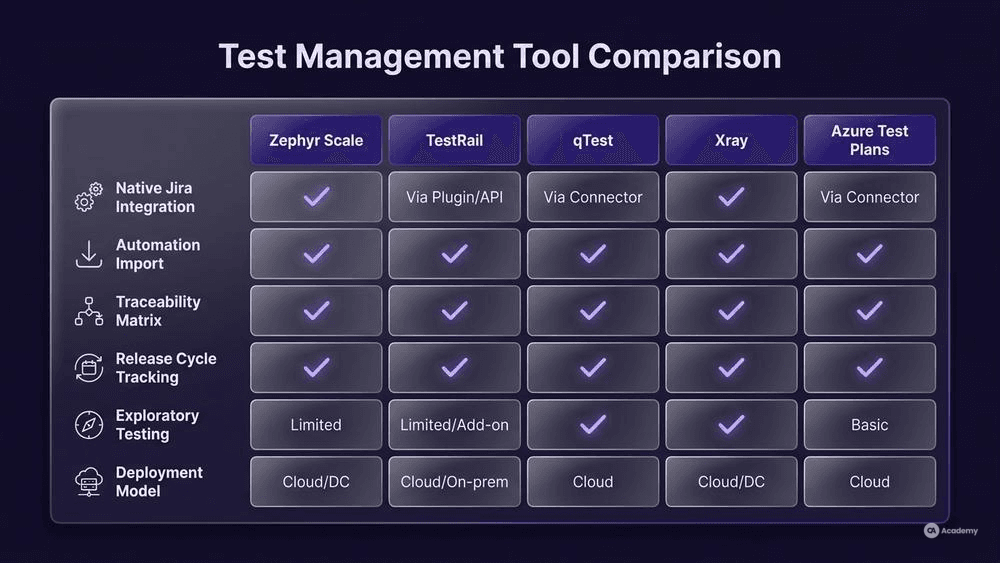
The table below compares widely used test management tools across criteria that matter most during selection. All tools listed are real, commercially available platforms with verifiable capabilities.
Feature / Tool | Zephyr Scale (Jira) | TestRail | qTest | Xray (Jira) | Azure Test Plans |
|---|---|---|---|---|---|
Native Jira integration | Yes (embedded) | Via plugin | Via plugin | Yes (embedded) | No (Azure DevOps) |
Automation result import | REST API, CI plugins | REST API, CLI | REST API, CI plugins | REST API, CI plugins | Azure Pipelines native |
Requirement traceability matrix | Built-in | Built-in | Built-in | Built-in | Built-in |
Release cycle tracking | Via Jira versions | Test plans per milestone | Release-based views | Via Jira versions | Iterations / sprints |
Exploratory testing support | Session-based | Limited | Session-based | Exploratory board | Exploratory extension |
Deployment model | Cloud / Data Center | Cloud / On-prem | Cloud | Cloud / Data Center | Cloud |
Pricing model | Per-user | Per-user | Per-user | Per-user (tiered) | Included in Azure DevOps |
Selection tip: If your organization already lives in Jira, Zephyr Scale or Xray remove an integration layer. If you use Azure DevOps, Azure Test Plans is the lowest-friction option. TestRail and qTest are strong choices for teams that want a standalone platform with broader integrations.
Real-world Example / Case Study
⚠️ Disclaimer: The following scenario is an illustrative example based on typical industry patterns. The specific metrics are hypothetical estimates designed to demonstrate realistic outcomes, not measured data from a documented project. They should not be cited as factual benchmarks.
Context
A mid-sized fintech company with 12 QA engineers across two Scrum teams managed testing through a combination of Confluence pages, Jira subtasks, and a shared Google Sheet nicknamed "the tracker." Release cadence was bi-weekly.
Challenge
The team could not produce a reliable test status report without two hours of manual aggregation. Requirement traceability existed only in one tester's head. When that tester went on leave, the team discovered that roughly 30% of test cases had no clear link to a current requirement. Defects logged during testing frequently lacked a reference to the failing test case, making root-cause triage slower.
Solution
The team selected a Jira-embedded test management tool (in this illustrative scenario, a tool comparable to Zephyr Scale or Xray) and followed a phased rollout:
- Weeks 1–2: Migrated and pruned the test case repository. Retired 200 of 800 cases that were obsolete or duplicated.
- Weeks 3–4: Configured test execution cycles per sprint. Enabled automated daily dashboards.
- Weeks 5–6: Connected the CI pipeline so automated regression results imported directly.
- Weeks 7–8: Built the requirement traceability matrix linking Jira epics → test cases → defects.
Results (Illustrative)
- Report generation time dropped from roughly 2 hours to approximately 10 minutes per release.
- Requirement coverage visibility went from unmeasured to roughly 85% of active requirements linked to at least one test case.
- Defect-to-test linkage improved from an estimated 40% to approximately 90% of defects referencing the originating test.
- Escaped defects in production decreased by an estimated 55% over three release cycles, likely due to improved coverage awareness and faster triage.
Key Takeaways
- Cleaning the test case repository before migration prevented garbage-in-garbage-out.
- Phased rollout let the team absorb changes without stalling sprint work.
- The biggest win was not the tool itself but the traceability discipline it enforced.