



You have a numeric input field that accepts values from 1 to 100. Your team writes a handful of test cases — maybe 5, 50, and 99 — and calls it done. Then a production defect slips through because someone entered 0, or 101, or exactly 1. The fix is trivial, but the escaped defect is not: it costs time, credibility, and sometimes money. Boundary value analysis (BVA) exists precisely to prevent this pattern. It is a black-box test design technique that focuses your effort on the values where defects are most likely to hide — the edges of valid and invalid ranges. This article gives you a practical, step-by-step workflow you can apply to your next sprint.
What Is Boundary Value Analysis?
Boundary value analysis is a black-box test design technique derived from equivalence partitioning (EP). Where EP divides an input domain into classes of values that the system is expected to treat identically, BVA narrows the focus to the values at the edges of those partitions [1].
The ISO/IEC/IEEE 29119-4 standard defines BVA as a technique that derives test cases from the boundary values of ordered partitions [2]. The ISTQB Foundation Level syllabus reinforces this by describing BVA as a technique used to exercise the values on or near the boundaries of equivalence partitions [1].
The underlying rationale is straightforward: implementation errors — off-by-one mistakes, incorrect comparison operators, truncated ranges — tend to surface at the transition points between partitions rather than in their interiors. BVA targets exactly those transition points.
Why Boundary Testing Matters for QA
BVA matters because it gives you high defect-detection potential from a small number of test cases. Instead of testing dozens of random values within a valid range, you select the few values at the boundaries that are statistically more likely to reveal faults.
Consider a field that accepts integers 1–999. Random testing within that range could require hundreds of inputs before stumbling on a boundary fault. BVA systematically selects values like 0, 1, 2, 998, 999, and 1000 — six values that cover every critical transition. This makes BVA particularly valuable in contexts where boundary conditions are critical, such as numeric field limits, date ranges, string length constraints, and financial calculations [1].
BVA also serves as a natural complement to EP. While EP ensures you cover each partition with at least one representative value, BVA ensures you test the seams between partitions. Using both techniques together provides a level of coverage that neither achieves alone [1], [2].
How to Apply BVA Step by Step
Here is a repeatable workflow you can use in any sprint. It assumes you have already identified the equivalence partitions for your input domain.
Prerequisites and Setup
Before you generate boundary test data, confirm these items:
- Requirement clarity. The specification must define explicit numeric field limits, ranges, or constraints. If boundaries are ambiguous, resolve them with the product owner before designing tests.
- Equivalence partitions identified. BVA builds on EP. If you have not partitioned your input domain yet, do that first [1].
- Data type understood. Know whether the input is integer, decimal, date, or string-length. The precision of the data type determines what "adjacent" means.
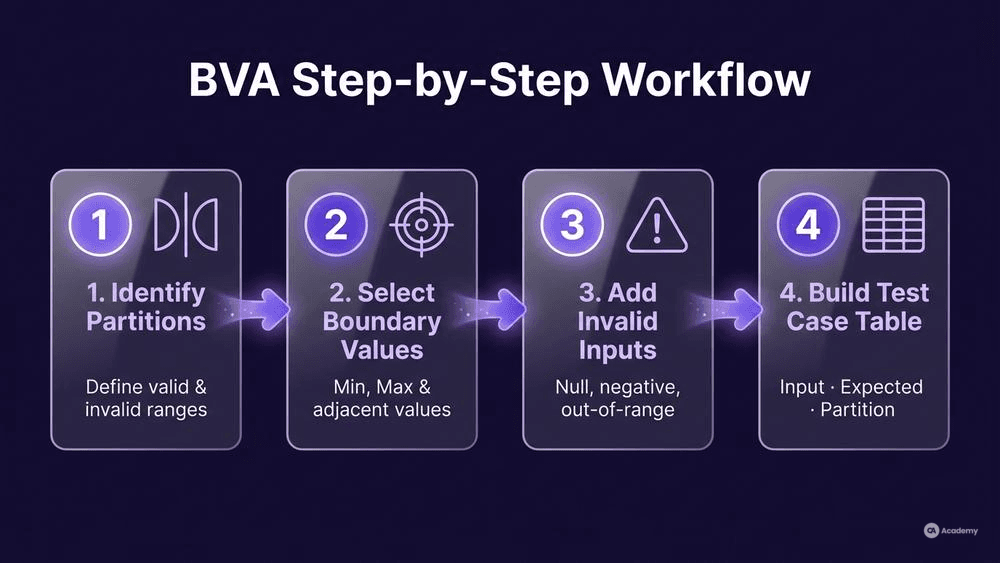
Step 1: Identify Every Boundary
For each equivalence partition, list the minimum and maximum values. For an integer field accepting 1–100, the boundaries are:
Partition | Lower Boundary | Upper Boundary |
|---|---|---|
Invalid low | — | 0 |
Valid | 1 | 100 |
Invalid high | 101 | — |
Step 2: Select Boundary Test Values
At each boundary, select the values on both sides. The ISTQB syllabus distinguishes two approaches — two-value and three-value — which are covered in the next section [1]. At minimum, select:
- The boundary value itself
- The value immediately adjacent on the other side of the boundary
For the 1–100 example, the minimum two-value set is: 0, 1, 100, 101.
Step 3: Add Invalid Input Points
Extend your selection to include clearly invalid input points beyond the adjacent values. These catch broader error-handling failures:
- Negative numbers (e.g., -1)
- Zero (if outside the valid range)
- Values well beyond the upper limit (e.g., 9999)
- Empty input, null, or non-numeric characters
Step 4: Build the Test Case Table
Assemble your boundary test data into a structured table suitable for your test management tool:
Test ID | Input Value | Expected Result | Partition |
|---|---|---|---|
BVA-01 | 0 | Rejected | Invalid low |
BVA-02 | 1 | Accepted | Valid (lower boundary) |
BVA-03 | 2 | Accepted | Valid (near lower boundary) |
BVA-04 | 99 | Accepted | Valid (near upper boundary) |
BVA-05 | 100 | Accepted | Valid (upper boundary) |
BVA-06 | 101 | Rejected | Invalid high |
Common Pitfalls
- Forgetting non-numeric inputs. BVA focuses on ordered values, but real users also enter letters, special characters, and whitespace. Add these as separate test cases outside BVA.
- Ignoring precision. For decimal fields, "adjacent" depends on the precision. If the field accepts values to two decimal places (e.g., 0.01–99.99), your boundary values should include 0.00, 0.01, 99.99, and 100.00.
- Assuming boundaries are inclusive. Verify whether each boundary is inclusive (≤) or exclusive (<). A boundary specified as "less than 100" means 99 is the last valid value, not 100.
Two-Value vs. Three-Value BVA
The ISTQB syllabus defines two levels of BVA [1]:
Method | Values Selected per Boundary | Example (boundary at 100, valid ≤ 100) |
|---|---|---|
Two-value | The boundary value + one adjacent value across the boundary | 100, 101 |
Three-value | The boundary value + one value on each side | 99, 100, 101 |
Two-value BVA is the minimum approach. It gives you fewer test cases but still covers the critical transition. It works well when you are confident in the specification and the implementation is straightforward.
Three-value BVA is more thorough. The additional value on the valid side of the boundary catches faults where the implementation is off by one in the opposite direction. In contexts where the cost of a missed defect is high — financial systems, safety-critical software, healthcare applications — three-value BVA is generally the better choice.
Which should you use? Let risk guide the decision. For a low-risk form field, two-value often suffices. For edge condition values in a payment processing module, three-value provides a stronger safety net.
Best Practices for Boundary Test Data
- Always pair BVA with equivalence partitioning. BVA without EP is incomplete — you might test boundaries but miss entire partitions. EP without BVA leaves the most fault-prone values untested [1], [2].
- Test each variable independently first. When a function has multiple inputs, hold all other inputs at nominal (mid-range) values while you exercise the boundaries of one input at a time. This keeps the test set manageable and the root cause of failures obvious.
- Extend BVA to non-numeric domains. Boundaries exist wherever there is an ordered set: date ranges (first and last day of a month), string lengths (minimum and maximum character counts), list sizes (0 elements, 1 element, maximum elements), and enumerated states.
- Document the boundary source. In your test case description, reference the exact requirement or specification clause that defines the boundary. This makes traceability audits straightforward and supports ISO/IEC/IEEE 29119-3 test documentation practices [3].
- Automate boundary tests early. Boundary test cases are stable — they change only when the specification changes. This makes them strong candidates for automation in your CI/CD pipeline.
- Review boundaries when requirements change. Any change to a range, limit, or constraint should trigger a review of the corresponding BVA test cases. Stale boundary values in your regression suite are worse than no boundary tests at all, because they create a false sense of coverage.
What NOT to Do with BVA
Knowing what to avoid is as important as knowing the technique itself. These anti-patterns undermine the value BVA can deliver:
- Do NOT treat BVA as a standalone technique. BVA tests boundaries, but it does not cover business logic, workflow sequences, or state transitions. Combine it with techniques like decision table testing and state transition testing for broader coverage [1].
- Do NOT skip boundaries on "obvious" fields. Teams sometimes assume simple fields like age or quantity do not need boundary testing because "the UI handles it." UI validation can be bypassed via API calls, browser developer tools, or direct database manipulation. Test the boundaries at every layer.
- Do NOT multiply test cases unnecessarily. For a function with three inputs, each with two boundaries (lower and upper), you do not need to test every combination of all boundary values simultaneously. That combinatorial explosion defeats the purpose. Test each variable's boundaries independently first; reserve combinations for risk-critical interactions only.
- Do NOT confuse boundary values with error-guessing. BVA is systematic and specification-driven. Error guessing is experience-based. Both are valid, but they serve different purposes. BVA gives you a repeatable, auditable set of test cases; error guessing supplements it with creative, intuition-driven scenarios.
- Do NOT assume the same boundaries apply across environments. A field that accepts 1–100 in the front end might have a different constraint in the database (e.g., SMALLINT with a range of -32768 to 32767). Verify boundaries at each integration point.
Tools Comparison
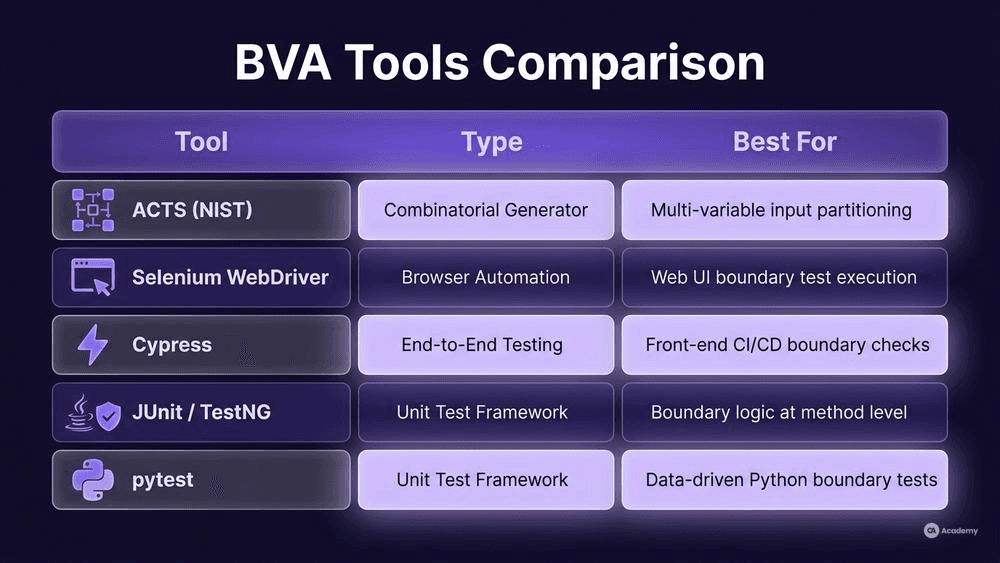
The following tools support or complement boundary value analysis in different ways:
Tool | Type | BVA Support | Best For |
|---|---|---|---|
ACTS (NIST) | Combinatorial test generator | Generates input combinations including boundary values | Systematic input domain partitioning with multiple variables |
Selenium WebDriver | Browser automation | Executes BVA test cases against web UI | Automating boundary tests for web form numeric field limits |
Cypress | End-to-end testing | Executes BVA test cases with fast feedback | Front-end boundary validation in CI/CD pipelines |
JUnit / TestNG | Unit test framework | Parameterised tests for boundary values | Testing boundary logic at the unit/method level |
pytest | Unit test framework (Python) | Parameterised fixtures for boundary data | Python-based boundary testing with data-driven approach |
No single tool "does BVA for you." The technique is a design activity — you identify the boundaries and select the values. Tools help you execute and automate the resulting test cases.
Real-World Example
⚠️ Disclaimer: The following scenario is an illustrative example based on typical industry patterns. The specific metrics are hypothetical estimates designed to demonstrate realistic outcomes, not measured data from a documented project. They should not be cited as factual benchmarks.
Context
A mid-sized fintech team maintains a loan-origination platform. The system has dozens of numeric input fields: loan amounts, interest rates, repayment terms, applicant age, and credit scores. Each field has specification-defined ranges.
Challenge
The team relied primarily on equivalence partitioning and exploratory testing. Boundary-specific tests existed for a few critical fields but were not applied systematically. Production defects kept appearing in scenarios like a 0% interest rate being accepted when the minimum was 0.01%, or a repayment term of 361 months passing validation when the maximum was 360.
Solution
The team introduced a structured BVA workflow:
- Inventory of boundary-critical fields. They catalogued every numeric and date field with defined ranges — approximately 40 fields across the application.
- Systematic BVA applied. For each field, they applied two-value BVA (minimum for lower-risk fields) and three-value BVA (for financial calculation inputs).
- Automation of boundary suites. Boundary test cases were parameterised in pytest and integrated into the CI pipeline, running on every pull request.
- Review trigger. Any requirement change to a field's range automatically flagged the corresponding BVA test cases for update.
Results (Illustrative Estimates)
- Boundary-related production defects dropped by an estimated 65% in the first quarter after adoption.
- The total number of BVA test cases for the application was approximately 200 — manageable within the existing automation infrastructure.
- The team estimated that regression cycle time for boundary validation decreased by roughly 50% compared to the previous manual approach.
Key Takeaways
- Systematic BVA, even at the two-value level, can surface defects that equivalence partitioning alone tends to miss.
- Automating boundary tests is practical because the test cases are stable and data-driven.
- The highest return typically comes from applying BVA to fields with financial, safety, or regulatory significance first.