



You just finished running the full regression suite. Every test case passed. The build looks green. Then a developer casually clicks through the app during a demo — and the entire checkout flow breaks on a screen nobody wrote a test for. That scenario is painfully common. Ad hoc testing exists precisely to catch the defects that scripted test execution cannot anticipate. In this article, you will learn how to run structured-yet-unscripted test sessions that consistently surface hidden bugs. We will cover practical workflows, common pitfalls, tool options, and a way to integrate informal bug discovery into your STLC without chaos.
What Is Ad Hoc Testing?
Ad hoc testing is a form of software testing performed without formal test cases, predefined test plans, or documented expected results. The tester relies on domain knowledge, intuition, and experience to explore the application and discover defects that structured test design might overlook.
The ISTQB Foundation Level syllabus distinguishes ad hoc testing from exploratory testing by noting that exploratory testing involves simultaneous learning, test design, and test execution within structured time-boxes, whereas ad hoc testing is typically less formalized [1]. ISO/IEC/IEEE 29119-1:2022 reinforces this by defining testing as a set of activities conducted to facilitate discovery and evaluation of software properties — ad hoc testing addresses the discovery dimension most directly [2].
Why It Matters for QA
Scripted tests validate what you already know should work. Ad hoc testing targets what you do not yet know could break. This distinction is critical in several situations:
- Post-deployment hotfixes where time does not permit full test design.
- New feature integrations where interaction effects are unpredictable.
- Late-sprint risk areas that the formal test suite has not yet covered.
When a tester performs spontaneous test execution against a feature, they often simulate real user behavior more closely than a predetermined script can. That cognitive diversity — different testers approaching the same feature with different mental models — tends to reveal edge-case defects that uniform test scripts frequently miss.
Think of ad hoc testing as a directed conversation with the software: you ask questions the test plan never thought to include.
Where Ad Hoc Testing Fits in the STLC
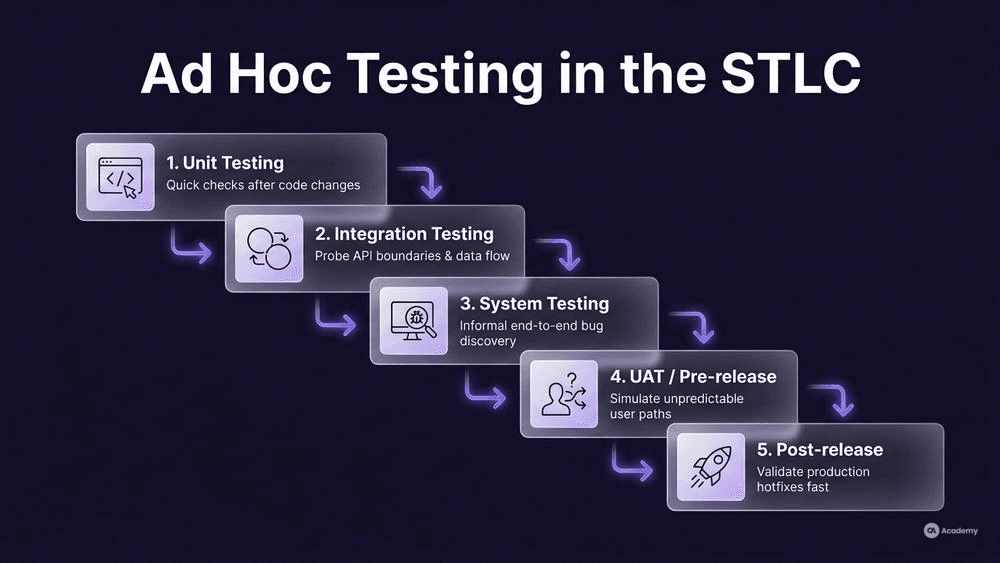
Ad hoc testing is not a replacement for any STLC phase. It is a complementary activity that can be inserted at multiple points. ISO/IEC/IEEE 29119-2:2021 defines test processes that include test design and test execution as distinct activities [3]. Ad hoc testing compresses these into a single, fluid action — but it still needs a deliberate place in your workflow.
Typical insertion points:
STLC Phase | Ad Hoc Testing Purpose |
|---|---|
Unit / Component Testing | Developer-led quick checks after code changes |
Integration Testing | Probing API boundaries and data flow between modules |
System Testing | Informal bug discovery across end-to-end workflows |
UAT / Pre-release | Simulating unpredictable user paths |
Post-release | Rapid validation of production hotfixes |
The key principle: ad hoc testing works best when it is scheduled but unscripted. You allocate a specific time window — say, 45 minutes after the daily standup — but you do not prescribe what the tester should click on or what inputs to use. The exploration itself is the method.
How to Run Effective Unscripted Test Sessions
Running ad hoc testing well requires more discipline than running scripted tests poorly. Here is a step-by-step workflow your team can adopt immediately.
Prerequisites and Setup
Before starting any unscripted test session, make sure these conditions are met:
- Stable build deployed to a test environment (not a developer's local machine).
- Access to logs — browser console, server logs, or an observability dashboard.
- A lightweight note-taking tool open for immediate defect capture.
- Context briefing — the tester should know which features changed in the latest build, even if they will not follow a script.
Step 1: Define a Focus Area (Not a Script)
Choose a broad area rather than a specific scenario. For example: "Payment module after the tax calculation refactor" gives direction without constraining the tester's exploration.
Step 2: Set a Time Box
Limit each session to 30–60 minutes. Unstructured testing without a boundary often leads to fatigue and diminishing returns. The testing itself remains unscripted; the time slot, ideally, is fixed.
Step 3: Explore with Intent
Use quick test scenarios as mental prompts rather than formal steps:
- What happens if I submit an empty form?
- What if I navigate back mid-transaction?
- What does the app do with special characters in this input field?
- How does the UI respond if I switch between tabs rapidly?
Step 4: Capture Findings Immediately
Every defect — even a cosmetic one — gets an immediate defect report. Use a minimal template:
Ad Hoc Bug Note Template:
Feature:       [Area explored]
Action:        [What you did]
Expected:      [What you expected]
Actual:        [What happened]
Severity:      [Critical / Major / Minor / Cosmetic]
Screenshot:    [Attached Y/N]
Build/Env:     [Version + environment]
This template is intentionally lightweight. The goal is zero-friction capture so that nothing gets forgotten between the moment of discovery and the next standup.
Step 5: Debrief and Triage
After the session, spend 10 minutes reviewing findings with the team. Decide which bugs warrant formal tickets and which are already known. This debrief also feeds future test design — if ad hoc testing repeatedly finds issues in the same area, that area likely needs formal regression coverage.
Best Practices for Spontaneous Test Execution
These practices separate productive ad hoc testing from random clicking:
- Rotate testers across features. Familiarity breeds blind spots. A tester who built the regression suite for Module A may be the worst person to do ad hoc testing on Module A — they will unconsciously follow the same paths.
- Pair with developers. A developer-tester pair during an ad hoc session often produces faster root-cause identification. The tester drives; the developer watches logs.
- Document patterns, not steps. Instead of writing step-by-step reproduction instructions during the session, note the pattern (e.g., "concurrent input in multi-tab flows") and formalize later.
- Use unstructured test execution strategically. Reserve ad hoc testing for high-uncertainty areas. For stable, well-understood features, scripted regression is typically more efficient.
- Track session outcomes. Even informal sessions should produce a brief summary: areas covered, bugs found, areas that felt risky but showed no defects. This data helps calibrate future test effort.
Common Pitfalls — and How to Avoid Them
Pitfall 1: No Documentation at All
A common and significant failure mode in ad hoc testing is failing to log any findings. If a tester explores for 45 minutes and reports nothing — no bugs and no areas covered — the session is invisible and unrepeatable.
Recovery: Mandate the lightweight bug note template above, even for sessions that find zero defects. A "clean session report" is still valuable: it tells the team that area X was explored under conditions Y and no issues were found.
Pitfall 2: Scope Creep
Without boundaries, a tester can drift from the payment module to the user profile page to the admin dashboard in a single session, covering everything superficially and nothing thoroughly.
Recovery: Enforce the focus area from Step 1. If the tester discovers something interesting outside their focus area, they note it as a "follow-up topic" and stay on track.
Pitfall 3: Using Ad Hoc Testing as the Only Testing
Ad hoc testing is powerful but incomplete. It does not provide repeatable coverage, traceability, or regression safety. Teams that rely on it exclusively tend to have inconsistent release quality.
Recovery: Treat ad hoc testing as one technique in a broader test strategy. ISO/IEC/IEEE 29119-4:2021 defines multiple test techniques — ad hoc testing complements, rather than replaces, techniques such as equivalence partitioning or boundary value analysis [4].
When Should You Typically Avoid Ad Hoc Testing?
- Regulated environments requiring full traceability (e.g., medical devices, aerospace). Here, every test must be documented against a requirement. Ad hoc testing can still happen, but findings must be immediately formalized.
- Performance / load testing. Spontaneous test execution does not produce the quantitative baselines that performance testing demands.
- Compliance audits. Auditors want to see test plans, test cases, and execution logs — not a note that says "I clicked around for an hour."
Tools Comparison
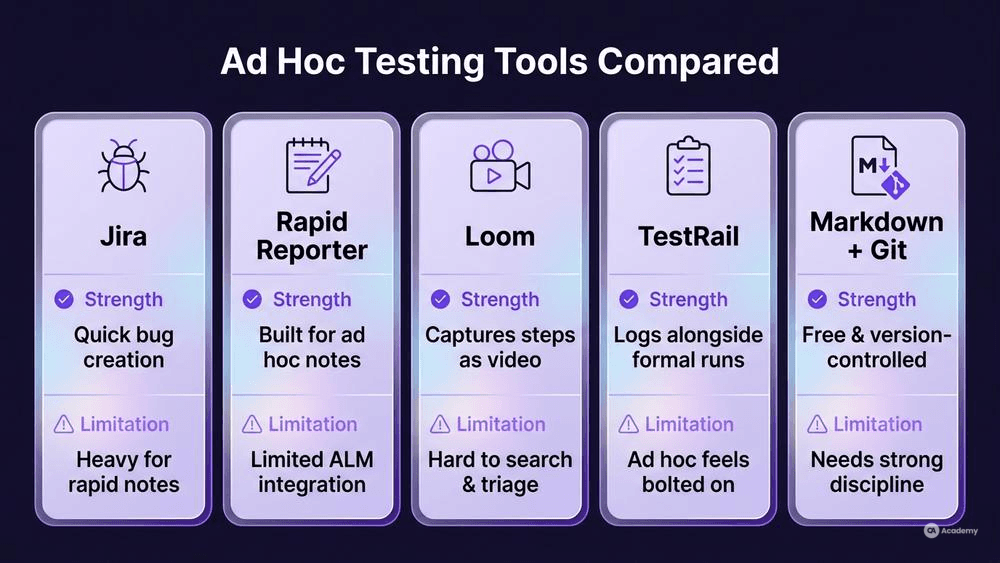
You do not need specialized tools for ad hoc testing, but the right tooling can significantly reduce the friction of capture and reporting.
Tool | Primary Use | Ad Hoc Testing Strength | Limitation |
|---|---|---|---|
Jira | Issue tracking | Quick bug creation from anywhere; integrates with CI/CD | Heavyweight for rapid note-taking during a session |
Rapid Reporter | Session-based note-taking | Built specifically for exploratory and ad hoc notes; lightweight | Limited integration with enterprise ALM tools |
Loom | Video recording | Captures exact reproduction steps as video; no need to type | Videos are harder to search and triage than text |
TestRail | Test management | Can log ad hoc results alongside formal test runs | Designed for scripted tests; ad hoc workflows feel bolted on |
Markdown + Git | Lightweight documentation | Zero cost; version-controlled session notes | Requires discipline; no built-in workflow |
Choose based on your team's existing toolchain. The best tool is the one your testers will actually use during a fast-paced session.
Real-World Example
⚠️ Disclaimer: The following scenario is an illustrative example based on typical industry patterns. The specific metrics are hypothetical estimates designed to demonstrate realistic outcomes, not measured data from a documented project. They should not be cited as factual benchmarks.
Context
A mid-sized fintech team runs two-week sprints with a mature regression suite of approximately 1,200 automated tests. Despite strong scripted coverage, the team notices that a disproportionate number of production incidents originate from integration points between their payment gateway and third-party banking APIs — areas that are difficult to cover with deterministic test scripts.
Challenge
The integration layer handles asynchronous callbacks, partial failures, and retry logic. Writing scripted test cases for every possible state combination is impractical — the input space is too large, and the third-party API behavior is not fully documented.
Solution
The team introduces structured ad hoc testing sessions: three 45-minute sessions per sprint, each focused on a specific integration risk area. Two testers rotate per session. They use the lightweight bug note template described earlier and debrief with the development team immediately after each session.
Illustrative Results
Metric | Before | After | Change |
|---|---|---|---|
Integration-related production incidents per quarter | ~12 | ~4 | ~67% reduction |
Average time from defect discovery to fix | ~3 days | ~6 hours | ~75% faster |
Defects found pre-release in integration layer | ~5 per sprint | ~14 per sprint | ~180% increase |
Key Takeaways
- Ad hoc testing complements automation — it does not compete with it. The automated suite continued to run; ad hoc sessions targeted the gaps.
- Short, focused sessions outperform long, unfocused ones. The 45-minute time box forced intensity.
- Immediate debriefs accelerated fixes. When a tester and a developer discuss a bug within minutes of discovery, the fix cycle compresses dramatically.
- Rotation prevented blind spots. Different testers explored the same integration points with different mental models, revealing distinct classes of defects.