



You have run hundreds of test cases, found critical defects before release, and built a regression suite the team relies on. Then an auditor, a new team member, or a stakeholder asks one simple question: "Where is the evidence?" If the answer involves digging through email threads, stale spreadsheets, and someone's local drive, you have an artifact problem. Artifacts are the documented proof that testing happened, that decisions were justified, and that quality was measured. Without a deliberate artifact workflow, even the best testing effort becomes invisible. This guide walks you through what artifacts are, which ones matter at each STLC phase, and how to build a system that keeps them alive and useful.
What Are Artifacts in the STLC?
An artifact, in software testing, is any tangible, versioned deliverable that a QA team produces or consumes during the Software Testing Life Cycle. ISO/IEC/IEEE 29119-3 defines a comprehensive set of test documentation templates—test plans, test designs, test cases, test procedures, test logs, and test completion reports—that serve as the canonical reference for what artifacts a testing process should produce [1].
Think of artifacts as the "receipts" of your testing effort. They answer three questions: what was planned, what was executed, and what was the outcome.
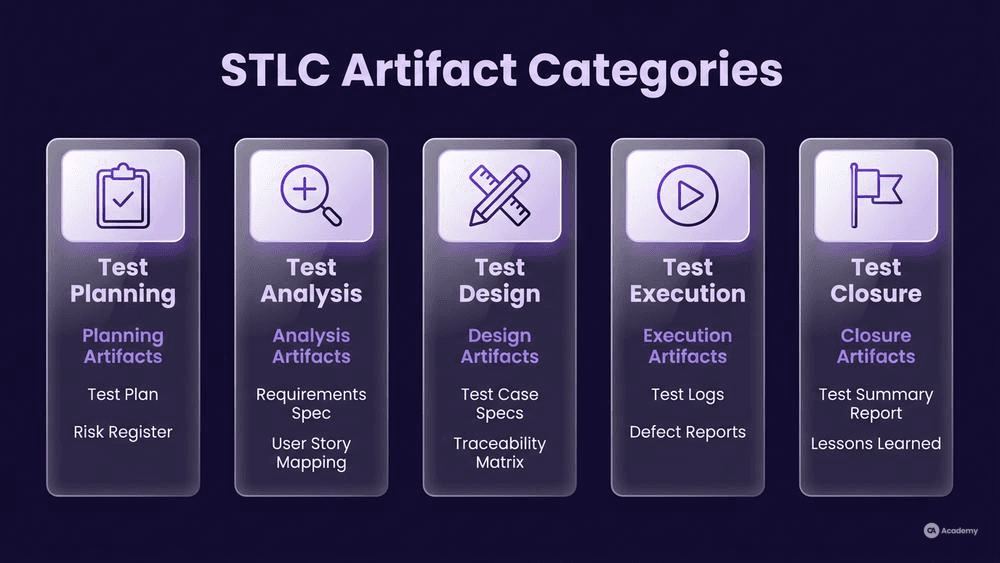
Artifact Categories at a Glance
Category | Examples | STLC Phase |
|---|---|---|
Planning artifacts | Test plan, test strategy, project plan baseline, risk register | Test Planning |
Analysis artifacts | Requirement specifications document, user story mapping, design models UML | Test Analysis |
Design artifacts | Test case specifications, test data sets, traceability matrix | Test Design |
Execution artifacts | Test logs, defect reports, change request form | Test Execution |
Closure artifacts | Test summary report, lessons learned, metrics dashboard | Test Closure |
Why Artifacts Matter for QA
Artifacts are not bureaucratic overhead. They serve three functions that directly affect your team's effectiveness.
1. Traceability. A requirement specifications document links business needs to test conditions. Without that link, you cannot prove coverage, and you cannot perform impact analysis when a change request form arrives mid-sprint.
2. Repeatability. Test procedures captured as artifacts let any team member re-execute a suite without tribal knowledge. The ISTQB Foundation Level syllabus identifies test documentation as essential for enabling repeatable and auditable test processes [2].
3. Evidence. Regulated industries (finance, healthcare, automotive) require documented proof that testing occurred. Even in non-regulated environments, artifacts protect the team during post-mortems by providing an objective record of what happened and when.
How to Build a Practical Artifact Workflow
A workflow that connects artifact creation, review, storage, and retrieval is the difference between documentation that lives and documentation that rots. Below is a step-by-step approach you can adapt to your Scrum or Kanban team.
Prerequisites and Setup
Before you create a single document, align on three decisions:
- Single source of truth. Pick one platform (Jira + Confluence, Azure DevOps, Zephyr, etc.) where every artifact lives. No local drives, no email attachments.
- Naming convention. Agree on a pattern like
[ProjectCode]-[ArtifactType]-[Version]. Consistency here prevents "final_v2_REAL.docx" chaos. - Ownership model. Assign a DRI (Directly Responsible Individual) for each artifact type. The test plan is owned by the test lead; test case specs are owned by the analyst who wrote them.
Step 1: Map Artifacts to Your STLC Phases
Start with the artifact categories table above and remove what your project does not need. A two-week sprint on an internal tool does not need a 40-page test strategy. A safety-critical embedded system does. ISO/IEC/IEEE 29119-3 explicitly notes that the level of documentation should be tailored to the context of the project [1].
What not to do: Do not copy a heavyweight artifact template from a previous project without adapting it. Over-documentation creates artifacts that nobody reads, which is functionally the same as having no artifacts at all.
Step 2: Create Bidirectional Traceability
Traceability links requirements → test conditions → test cases → defects. This is where user story mapping and design models UML become inputs, not outputs, of your testing process. ISO/IEC/IEEE 29119-2 specifies test monitoring and control processes that depend on traceability to measure coverage and progress [3].
In practice, this means:
- Every user story or requirement gets a unique ID.
- Every test case references at least one requirement ID.
- Every defect references the test case that revealed it.
- Every change request form triggers an impact analysis that traces back through this chain.
Step 3: Automate What You Can
Manual traceability matrices in spreadsheets often decay if they are not rigorously maintained by someone with explicit ownership. Automate link creation where your tooling supports it. Most modern test management platforms (Zephyr Scale, qTest, PractiTest) generate RTMs automatically from linked Jira issues.
Step 4: Review and Baseline at Phase Gates
At the end of each STLC phase, review the phase's artifacts and establish a project plan baseline—a frozen snapshot that becomes the reference point. Any subsequent changes go through a formal change request form process. This prevents scope creep from silently invalidating your test plan.
Best Practices for Managing Test Artifacts
These practices separate mature QA teams from those that perpetually fight artifact sprawl.
Version everything. Use your platform's versioning, not filename suffixes. When a requirement changes, the test plan gets a new version, not a new file.
Keep artifacts atomic. A single test case should test a single condition. A single defect report should describe a single defect. Composite artifacts are harder to trace, harder to maintain, and harder to report on.
Review artifacts like code. Pull requests work for documentation too. Have a peer review every test plan and every test strategy before baselining. The review catches ambiguity, missing coverage, and unstated assumptions.
Retire obsolete artifacts. Mark deprecated artifacts clearly and archive them. A test case for a feature that no longer exists should not appear in your active suite. ISO/IEC/IEEE 29119-3 recommends maintaining test documentation through a defined lifecycle that includes retirement [1].
Tie artifacts to the Definition of Done. If your Scrum team's DoD does not mention "test cases updated and linked," it is incomplete. Make artifact maintenance a completion criterion, not an afterthought.
Do not confuse volume with quality. A 200-page test plan that nobody reads provides less value than a 5-page test plan that the entire team has internalized. Tailor the depth and formality of each artifact to the risk level of what you are testing.
Tools Comparison for Digital Artifact Management
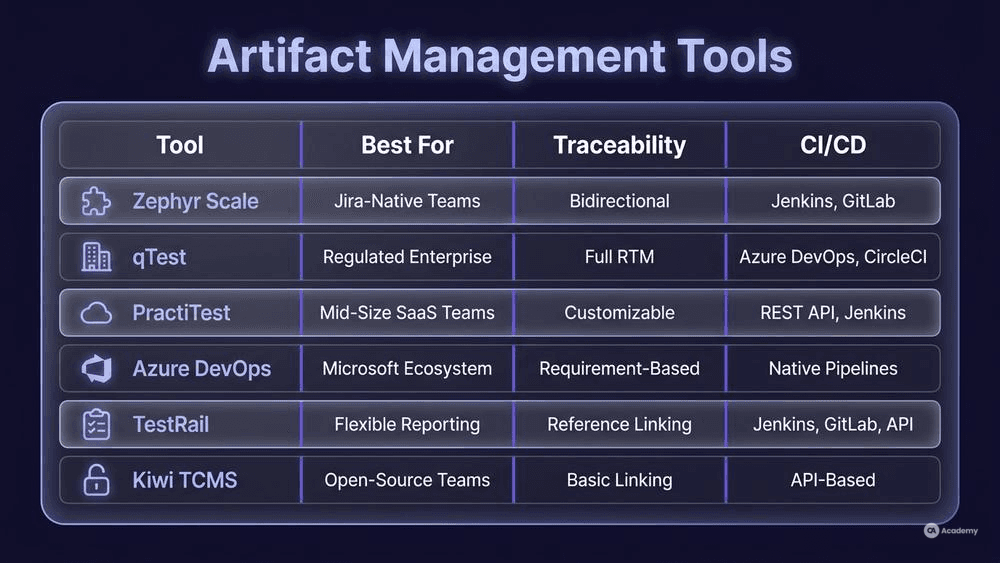
Choosing the right tool for digital artifact management depends on your team size, existing ecosystem, and compliance needs. Below is a comparison of real, widely-used platforms.
Tool | Best For | Traceability | CI/CD Integration | Licensing |
|---|---|---|---|---|
Zephyr Scale (Jira plugin) | Jira-native teams | Bidirectional with Jira issues | Jenkins, Bamboo, GitLab | Commercial |
qTest (Tricentis) | Enterprise, regulated industries | Full RTM, requirement linking | Jenkins, Azure DevOps, CircleCI | Commercial |
PractiTest | Mid-size teams, SaaS-first | Customizable traceability | REST API, Jenkins | Commercial |
Azure DevOps Test Plans | Microsoft ecosystem teams | Linked work items, requirement-based suites | Native Azure Pipelines | Commercial (included in Azure DevOps) |
TestRail (Gurock) | Teams needing flexible reporting | Reference-based linking | Jenkins, GitLab, CI/CD via API | Commercial |
Kiwi TCMS | Open-source, budget-constrained teams | Basic linking | API-based | Open Source |
What not to choose: Avoid using a general-purpose wiki (Notion, Google Docs) as your primary artifact store unless your team is very small and your compliance requirements are minimal. Wikis lack structured traceability, versioning audit trails, and baseline management.
Real-World Example: Artifact Overhaul in a Scrum Team {#real-world-example}
⚠️ Disclaimer: The following scenario is an illustrative example based on typical industry patterns. The specific metrics are hypothetical estimates designed to demonstrate realistic outcomes, not measured data from a documented project. They should not be cited as factual benchmarks.
Context
A mid-size fintech company with four Scrum teams (32 people total) had been building its payment processing platform for three years. Artifacts were scattered across Confluence pages, Google Sheets, local Excel files, and Slack messages.
Challenge
During a compliance audit preparation, the QA lead was asked to demonstrate traceability from regulatory requirements to test execution evidence. The team spent over two weeks manually reconstructing links between requirements, test cases, and defect reports. Key gaps included: no versioned test plans, no formal change request workflow, and test cases stored in spreadsheets with no link to user stories.
Solution
The team implemented a structured artifact workflow over one quarter:
- Migrated all test cases from spreadsheets to Zephyr Scale, linked to Jira user stories.
- Established a naming convention and DRI model for each artifact type.
- Created automated traceability between requirements (Jira epics/stories) → test cases (Zephyr) → defects (Jira bugs).
- Added artifact checkpoints to the team's Definition of Done: "Test cases linked to stories, test execution logged, defects linked to test cases."
- Baselined test plans at sprint boundaries and routed all mid-sprint changes through a lightweight change request form process.
Results (Illustrative)
- Audit preparation time for traceability evidence dropped from approximately two weeks to approximately two days.
- Orphaned test cases (cases not linked to any requirement) decreased from an estimated 40% to under 5%.
- The team estimated a reduction of roughly 60% in time spent searching for or recreating lost documentation.
Key Takeaways
- Migration is a one-time cost; the ongoing maintenance cost is low if artifacts are tied to the workflow, not bolted on after the fact.
- Traceability automation pays for itself the first time an auditor, a stakeholder, or a new team member needs to understand what was tested and why.
- The Definition of Done is the enforcement mechanism. Without it, artifact discipline erodes within weeks.
Common Pitfalls and What Not to Do {#common-pitfalls}
Learning from failure is often more instructive than following best practices. Here are the most frequent artifact anti-patterns:
Pitfall 1: Artifact hoarding. Creating every document template "just in case" without evaluating whether anyone will read or use it. Recovery: audit your artifact inventory quarterly; if an artifact type has not been read or updated in two sprints, question whether it belongs in your workflow.
Pitfall 2: Single-point-of-failure ownership. Only one person knows where the artifacts are or how the naming convention works. If that person leaves, the system collapses. Recovery: document your artifact workflow itself as an artifact (a short "QA Artifact Guide" in your wiki) and cross-train at least one other team member.
Pitfall 3: Treating artifacts as write-once deliverables. A test plan written at the start of the project and never updated is worse than no test plan, because it creates false confidence. Recovery: tie artifact updates to your change request form process. When scope changes, the affected artifacts change too.
Pitfall 4: Confusing test management tools with artifact management. A test management tool handles test cases and execution logs. But your artifact system also includes test strategies, risk registers, and compliance evidence. Make sure your workflow accounts for artifacts that live outside the test management tool.
FAQ {#faq}
What are project artifacts?
Project artifacts are the documented deliverables produced during a project's lifecycle. In software testing, these include test plans, test cases, defect reports, traceability matrices, and test summary reports. ISO/IEC/IEEE 29119-3 provides standardized templates for test documentation artifacts [1].
What are software development artifacts examples?
Common examples span the full SDLC: requirement specifications documents, design models UML, source code, build configurations, test plans, test cases, defect logs, deployment runbooks, and release notes. QA-specific artifacts focus on the testing phases: test strategy, test plan, test data, test execution logs, and test completion reports.
How do artifacts relate to SDLC phases?
Each SDLC phase produces and consumes specific artifacts. During requirements analysis, the team produces requirement specifications documents and user story mapping outputs. During design, design models UML capture architecture decisions. During testing, the STLC generates its own artifact chain (plan → design → execution → closure). During deployment, release notes and deployment checklists become the key artifacts. Traceability links these artifacts across phases so that a change in one phase triggers impact analysis in others.
What is digital artifact management?
Digital artifact management is the practice of organizing, versioning, storing, and retrieving project artifacts using digital tools rather than manual processes. It encompasses naming conventions, access controls, versioning policies, and automated traceability. Effective digital artifact management ensures that artifacts remain discoverable, current, and auditable throughout the project lifecycle and beyond.
How do you decide which artifacts your team actually needs?
Start from risk, not from a template catalog. ISO/IEC/IEEE 29119-3 recommends tailoring documentation to the project's context [1]. For a low-risk internal tool, a lightweight test plan and a linked set of test cases in your management tool may suffice. For a regulated medical device, you may need every artifact type the standard defines, with formal reviews and sign-offs at each phase gate. The guiding question is: "If this artifact did not exist, what risk would the team, the stakeholders, or the auditors face?"