



You have spent weeks building and unit-testing a feature, your staging environment looks clean, and the sprint review went well. Then you ship to beta—and real users hit a crash loop within the first hour. The problem was not a lack of testing; it was the wrong people testing in the wrong context. Alpha testing exists to close that gap. It places your product in front of representative users while it is still within your controlled environment, so the defects that matter surface before the code leaves your premises. This article walks you through a practical alpha testing process—from drafting an alpha test plan and setting up your staging environment to defining a product readiness gate that decides whether you proceed to beta or go back to fix.
What Is Alpha Testing?
According to the ISTQB Foundation Level syllabus, alpha testing is "performed at the developing organization's site, not by the development team, but by potential or existing customers, and/or operators, and/or an independent test team" [1]. The critical distinction is location and tester independence: the test happens at your site, but the testers are not the people who wrote the code.
This is the detail that most teams get wrong. Alpha testing is not an internal smoke-test run by developers between sprints. It is a structured evaluation conducted by people who bring an outside perspective—customer representatives, an independent QA group, or operations staff—while you still control the environment and can observe their interactions directly [1].
Why Alpha Testing Matters for QA
Alpha testing serves as a controlled bridge between verification (did we build it right?) and validation (did we build the right thing?). It targets the product quality characteristics defined in ISO/IEC 25010—functional suitability, usability, reliability, and performance efficiency—under near-production conditions but with the safety net of your own infrastructure [2].
Without a deliberate alpha phase, teams typically discover usability and integration defects only in beta or production, where the cost of remediation escalates and customer trust erodes. A well-run alpha cycle typically catches the majority of critical end-to-end defects before any external release, because testers operate on realistic workflows rather than scripted unit-level paths.
Ask yourself: When was the last time a defect reached beta that an independent tester on your own staging environment could have caught? If the answer is recent, your alpha process likely needs attention.
Where Alpha Testing Fits in the STLC
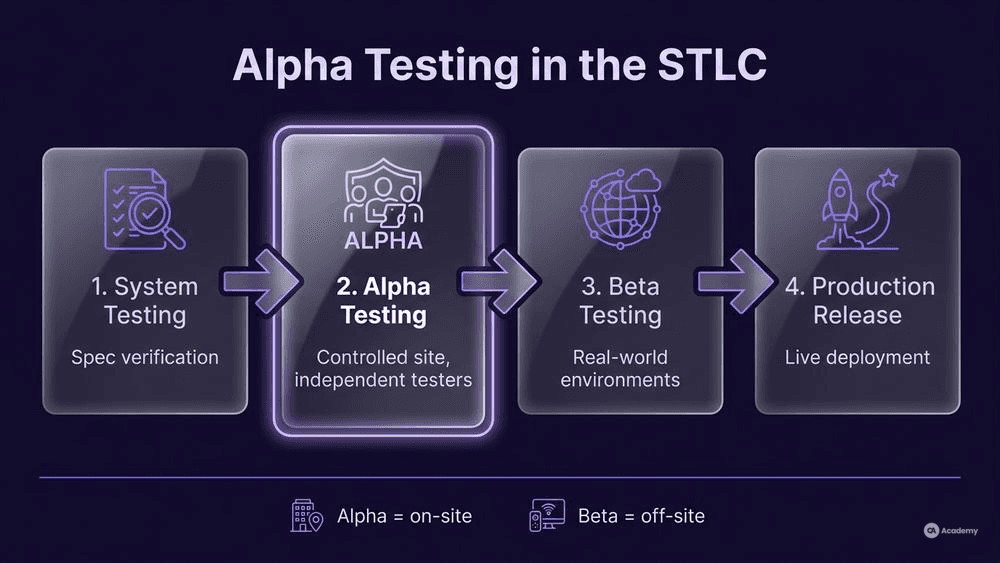
Alpha testing sits after system testing and before beta testing in the software testing life cycle (STLC). ISO/IEC/IEEE 29119-2 defines a hierarchy of test processes—organizational, management, and dynamic—that provide a framework for planning, monitoring, and controlling each test level [3]. Alpha falls within the dynamic test process, typically executed as a distinct test sub-process after system-level test completion and before the product leaves the developing organization's site.
Think of it as a staging gate: system testing confirms the build works against specifications; alpha testing confirms it works for real people in a realistic context; beta testing then validates it in uncontrolled, real-world environments.
Where teams should critically evaluate this model: Not every product needs a distinct alpha phase. If your system testing already involves independent testers on a production-mirror environment, you may already be covering alpha-level concerns. Before adding a formal alpha cycle, evaluate whether the cost of the additional phase is justified by your product's risk profile and user base. For safety-critical or regulated software, a formal alpha phase is almost always warranted; for a low-risk internal tool, a lighter approach may suffice.
How to Run Alpha Testing
Prerequisites and Staging Environment Setup
Your staging environment setup is the foundation. If the environment does not closely mirror production, the defects you find—or miss—are likely to be unreliable. At minimum, your staging environment should include:
- Production-equivalent data (anonymized or synthetic, matching volume and variety)
- Same infrastructure stack (OS, middleware, database versions, network topology)
- Integrated third-party services (payment gateways, APIs, auth providers—stubbed only when the real service is genuinely unavailable)
- Monitoring and logging identical to production (so you can observe tester behaviour and capture environment-level failures)
ISO/IEC/IEEE 29119-3 specifies that test environment requirements should be documented as part of the test plan, including hardware, software, network configuration, and any tools required for test execution [4]. Treat your staging environment specification as a living document, reviewed before each alpha cycle.
Step 1: Define Scope and Entry Criteria
Decide what you are testing and when alpha begins. Alpha testing generally does not mean testing everything—it focuses on end-to-end user workflows, integration points, and the areas of highest risk. Your entry criteria should typically include:
- System testing is complete with no unresolved critical defects
- The staging environment passes a readiness check
- Test data is loaded and validated
- An alpha test plan is approved (see next section)
Step 2: Select Alpha Testing Participants
Remember the canonical definition: alpha testers are not your development team [1]. Choose from:
- Internal users from other departments (support, sales, operations)
- Existing customers under NDA
- An independent test team with no prior involvement in the build
- Domain experts or operators who represent the end-user profile
Selecting the right participants is often the most impactful decision you make. A common anti-pattern is picking the most technically adept people in your organization—but alpha testing benefits most from testers who think like actual users, not like engineers.
Step 3: Execute and Log Defects
Run tests according to the alpha test plan. Establish a clear internal defect logging workflow:
- Severity and priority classification aligned with your organization's standards
- Reproducibility steps captured in the environment where the defect occurred
- Environment metadata auto-attached (browser, OS, build version, timestamp)
- Triage cadence: daily stand-up between alpha testers and the dev team during the alpha window
Dev team verification of reported defects should happen within the alpha cycle itself—do not defer all fixes to a later sprint. The value of alpha is that you can observe, reproduce, and verify fixes while testers are still engaged and the context is fresh.
Step 4: Evaluate Exit Criteria and the Product Readiness Gate
Your product readiness gate determines whether the build proceeds to beta. Avoid defining this as a fixed pass-rate percentage, which tends to encourage gaming rather than risk management. Instead, define the gate by risk:
- Fail the gate if any release-blocking or critical-severity defect remains open
- Fail the gate if a mandatory test suite did not complete execution
- Conditional pass if remaining open defects are triaged, accepted by the release owner, and documented with workarounds
- Pass when the team's agreed risk threshold is satisfied and the release owner signs off
Document the gate decision and its rationale. This becomes part of your test completion report as described in ISO/IEC/IEEE 29119-3 [4].
Building an Alpha Test Plan
A strong alpha test plan is the operational backbone of your alpha cycle. ISO/IEC/IEEE 29119-3 defines the structure and content of test plan documentation, including scope, approach, resources, schedule, and exit criteria [4]. Here is a reusable structure you can adapt:
Section | Content |
|---|---|
Objective | What the alpha cycle aims to validate (e.g., end-to-end checkout flow, API integration stability) |
Scope | Features in scope, features explicitly excluded, and rationale for exclusions |
Test environment | Staging environment specification (see Prerequisites above) |
Participants | Roles, names, and access credentials for alpha testers |
Test approach | Exploratory, scripted, or hybrid; risk-based prioritization |
Entry criteria | Conditions that must be met before alpha begins |
Exit criteria / Readiness gate | Risk-based gate definition (see Step 4 above) |
Defect workflow | Logging tool, severity taxonomy, triage cadence, escalation path |
Schedule | Start date, end date, daily or milestone checkpoints |
Risks and mitigations | What could derail the cycle and your contingency plan |
Design challenge: Take this template and adapt it to your current project. Which sections need the most customization? If you find that "Participants" is the hardest section to fill, that is usually a signal that your organization has not yet established a clear tester-independence model—and that is worth addressing before your next alpha cycle.
Best Practices
- Keep tester independence genuine. The moment developers start "helping" alpha testers navigate the product, you lose the independent perspective that makes alpha valuable. Provide documentation, not hand-holding.
- Time-box ruthlessly. Alpha cycles that drag on tend to lose participant engagement and delay the overall release. One to two weeks is typically sufficient for most products; adjust based on scope and risk.
- Instrument the environment. Session recordings, analytics, and structured logs give you data beyond defect reports. You can see where users hesitate, misclick, or abandon a workflow—insights that defect tickets alone rarely capture.
- Separate observation from intervention. If you are on-site with alpha testers, observe first and document what you see. Resist the urge to explain or guide. The confusion a tester experiences is itself a finding.
- Close the feedback loop. After the alpha cycle, share a summary of findings with participants. This builds trust for future alpha rounds and signals that their effort had impact.
Common Pitfalls and What Not to Do
- Do not use developers as alpha testers. This contradicts the definition of alpha testing and eliminates the independent perspective that gives alpha its value [1]. If you only have internal staff available, choose people from departments with no involvement in the build.
- Do not skip the staging environment check. Running alpha on an environment that diverges from production in meaningful ways—different database engine, missing integrations, stale data—typically leads to defects that cannot be reproduced in production and masks defects that will appear later.
- Do not treat alpha as a checkbox. If your alpha cycle consistently finishes with zero defects, that is generally not a sign of quality—it is often a sign that the scope, participant selection, or test approach needs revision.
- Do not defer all defect fixes to post-alpha. The advantage of alpha is that testers and developers share the same site. Use that proximity. Fix critical defects during the cycle and have testers verify the fix immediately (confirmation testing).
- Do not conflate alpha with user acceptance testing (UAT). UAT is a formal acceptance test level, often contractually mandated, where stakeholders validate that the system meets business requirements [1]. Alpha is broader: it validates real-world usability, reliability, and performance in a controlled setting. The two can overlap in practice, but they serve different purposes and typically involve different governance.
What happens if you ignore these? Teams that skip tester independence tend to discover usability defects only in production. Teams that skip environment parity tend to spend more time triaging "works on my machine" defects than fixing real ones. And teams that treat alpha as a formality tend to find that beta becomes their de facto alpha—except now they are doing it in front of real customers with no safety net.
Tools Comparison
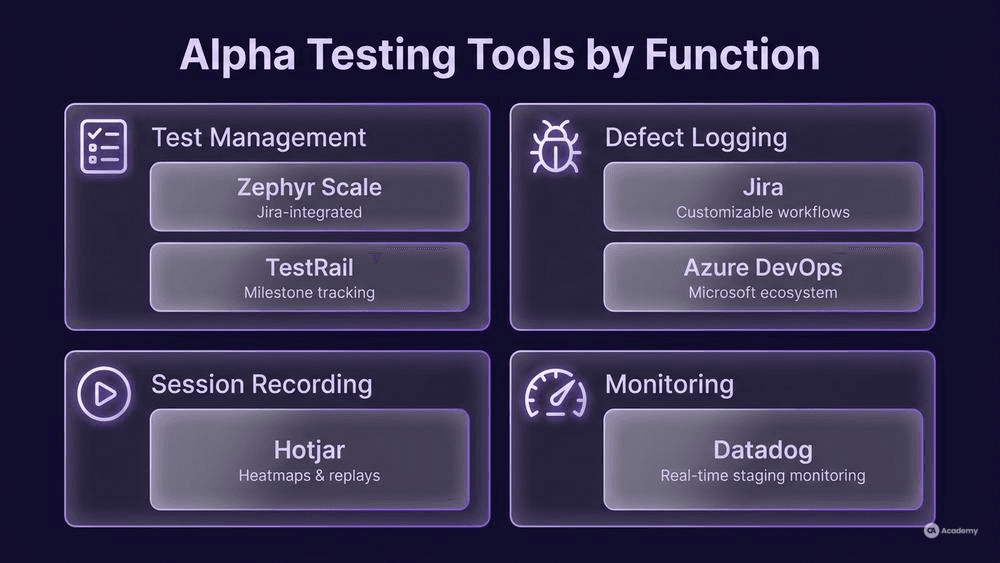
No single tool covers the full alpha testing workflow in most cases, but your existing QA toolchain likely handles each component. Here is a comparison of tools commonly used across the alpha cycle:
Function | Tool | Strength for Alpha Testing |
|---|---|---|
Test management | Zephyr Scale | Integrates with Jira; supports test plan, cycle, and execution tracking |
Test management | TestRail | Standalone test management with detailed reporting and milestone tracking |
Defect logging | Jira | Industry-standard issue tracker; customizable workflows for severity/priority |
Defect logging | Azure DevOps | Integrated boards and backlogs; strong for teams already in the Microsoft ecosystem |
Session recording | Hotjar | Heatmaps and session replays; useful for observing alpha tester behaviour |
Monitoring | Datadog | Real-time infrastructure and application monitoring on your staging environment |
Communication | Slack / Microsoft Teams | Real-time triage channel between alpha testers and the dev team |
Choose tools based on what your team already uses. The goal is minimal friction for alpha testers—they should spend their time testing, not learning a new toolchain.
Real-world Illustrative Scenario
⚠️ Disclaimer: The following scenario is an illustrative example based on typical industry patterns. The specific metrics are hypothetical estimates designed to demonstrate realistic outcomes, not measured data from a documented project. They should not be cited as factual benchmarks.
Context
A mid-sized fintech company was preparing to release a redesigned payment processing dashboard. The system had passed system testing with a low defect count, and the team was ready to push directly to a closed beta with selected customers.
Challenge
In two previous releases, the team had skipped a formal alpha phase and gone straight to beta. Both times, beta participants reported critical usability defects—confusing navigation, unclear error messages, and a broken reconciliation workflow—that required emergency patches and eroded customer confidence. The team needed a way to catch these interaction-level defects before external exposure.
Solution
The QA lead introduced a structured alpha testing cycle based on the process outlined above:
- Participants: Five members of the internal operations team (who used the dashboard daily but had no role in development) and two independent contract testers.
- Environment: A staging environment mirroring production, with anonymized transaction data at realistic volume.
- Alpha test plan: Scoped to the eight highest-risk user workflows, with risk-based entry and exit criteria.
- Duration: One week, with daily triage meetings and same-day dev team verification of critical defects.
- Readiness gate: The build would not proceed to beta if any critical defect remained open or if any mandatory workflow test was incomplete.
Results (Illustrative)
- Alpha testers identified 23 defects, including 4 critical usability issues that had not been covered by scripted system tests.
- The team fixed all critical defects within the alpha window, with confirmation testing completed by the same alpha participants.
- The subsequent beta cycle saw roughly 70% fewer critical defect reports compared to the previous two releases.
- The alpha cycle added one week to the timeline but eliminated the need for emergency patches during beta, resulting in an estimated net time saving.
Key Takeaways
- Independent testers on a production-mirror environment tend to catch defect categories that developer-led system testing misses—particularly usability and workflow-integration issues.
- Same-day triage and verification during alpha compresses the feedback loop in ways that post-cycle fix batches cannot match.
- The one-week investment typically pays for itself by reducing downstream beta and production defect costs.