


Your sprint is about to start. A tester discovers the staging environment is running a database version nobody approved. Another team member finds that your load-testing tool license expired last week. Meanwhile, the test data set everyone relies on was overwritten during a weekend deployment. Sound familiar? These are not random misfortunes — they are symptoms of weak asset management in your QA process. This article gives you a practical system for tracking, governing, and optimizing every asset your testing operation depends on. You will walk away with workflows, checklists, and a tools comparison you can adapt starting today.
What Is Asset Management in QA?
Asset management in a QA context means maintaining a governed, up-to-date inventory of every resource your testing activities depend on — and actively managing each resource through its full IT asset lifecycle. This goes well beyond a simple spreadsheet of laptops. It covers test environments, software licenses, hardware configurations, test data sets, automation frameworks, and the documentation that ties them all together.
ISO/IEC 19770-1 defines IT asset management as a system of processes and practices that enable an organization to manage, control, and protect its IT assets throughout their lifecycle [1]. In QA, you apply that same discipline to assets that are unique to testing: environment configurations that must mirror production, licensed tools with seat limits, and versioned test data that must remain consistent across regression cycles.
Why It Matters for QA
Poor asset management silently erodes test reliability. When your test environment inventory is inaccurate, defects slip through because the environment does not match production. When software license tracking lapses, your CI pipeline breaks mid-run because a tool token expired. When hardware configurations drift undocumented, performance test results become meaningless.
ISO/IEC/IEEE 29119-2 establishes that test processes require defined environments and resources as preconditions [2]. If those preconditions are unknown or uncontrolled, the test process itself lacks a reliable foundation. Asset management is the discipline that keeps those preconditions honest.
How to Build a QA Asset Management System
Building a QA asset management system does not require a massive upfront investment. It requires methodical work across four areas: inventorying what you have, assigning ownership, automating drift detection, and governing data.
Step 1: Build Your Test Environment Inventory
Start with a complete audit. Walk through every environment your team touches — development, integration, staging, pre-production, performance — and record:
- OS and version (e.g., Ubuntu 22.04, Windows Server 2022)
- Database engine and version
- Application server and middleware versions
- Network topology and access rules
- Provisioning method (manual, IaC template, container image)
Store this in a centralized configuration management database (CMDB) or a version-controlled repository. The key requirement from ISO/IEC/IEEE 29119-3 is that your test environment documentation be traceable and maintained [3] — not just created once and forgotten.
Step 2: Establish Software License Tracking
Create a license register that captures, for each tool:
Field | Example |
|---|---|
Tool name | Selenium Grid, JMeter, qTest |
License type | Open source / Commercial / SaaS |
Seat count or usage limit | 15 concurrent users |
Renewal date | Annual, next renewal March |
License owner | QA Lead |
Cost center | QA Operations |
Set calendar alerts 60 and 30 days before each renewal. Assign a single owner per license — ambiguous ownership is the primary reason licenses lapse unnoticed.
Step 3: Conduct a Hardware Configuration Audit
For physical and virtual hardware used in testing (performance test rigs, device labs, CI runners), document:
- CPU, memory, storage specs
- Network bandwidth and latency to dependent services
- Last verified configuration date
- Deviation from production hardware specs
A hardware configuration audit is especially critical for performance testing. If your load-generation machine has half the cores of production, your throughput baselines are unreliable. ISO/IEC 25010 defines performance efficiency as a product quality characteristic [4] — you cannot measure it accurately on mismatched hardware.
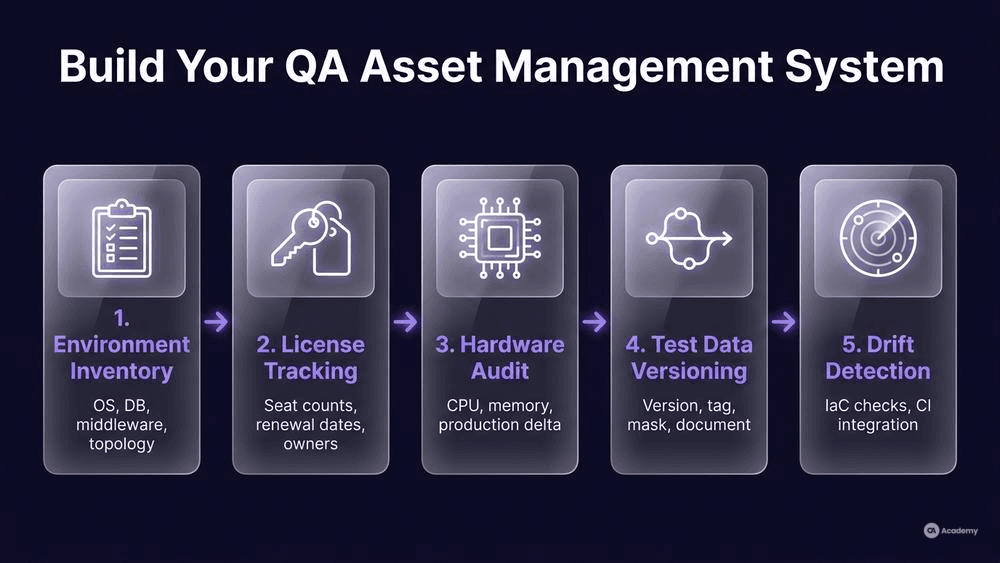
Step 4: Implement Test Data Versioning
Test data is one of the most overlooked QA assets. Without test data versioning, you cannot reproduce a failed test from last sprint because the data has changed underneath. Treat your test data like source code:
- Version it in Git or a dedicated test data management tool.
- Tag data sets to specific releases or test cycles.
- Mask production data for privacy compliance before importing it into test environments.
- Document data dependencies — which tests require which data sets, and in what state.
Step 5: Automate Drift Detection
Manual audits catch problems, but only at audit time. Between audits, configuration drift accumulates silently. Automate checks that compare the actual state of your environments and configurations against the documented baseline:
- Use IaC tools (Terraform, Ansible) to detect and report drift on environment configuration.
- Run scheduled scripts that verify license token validity and seat usage.
- Integrate configuration checks into your CI pipeline so that a build fails if the environment does not match the expected spec.
Best Practices for Sustaining Your Asset Program
Building an inventory is the straightforward part. Keeping it accurate over months and years is where most teams struggle. A well-maintained inventory on day one tends to degrade without ongoing governance, especially in fast-moving environments. These practices help prevent that decay.
Assign clear ownership. Every asset category — environments, licenses, hardware, test data — needs a named owner. Not a team, not "QA" generically, but a specific person responsible for accuracy.
Review quarterly. Schedule a lightweight quarterly audit where asset owners verify their registers against reality. Flag anything that has changed but was not updated.
Integrate with STLC milestones. Tie asset reviews to existing ceremonies. For example, during sprint planning, confirm that the environments and data sets needed for the sprint's test scope are available and current. During retrospectives, note any asset-related blockers that occurred.
Automate where possible, govern where not. Automation handles drift detection and license expiry alerts. But decisions like "should we renew this tool or switch to an alternative" require human judgment and a defined escalation path.
Treat asset documentation as a living artifact. ISO/IEC/IEEE 29119-3 emphasizes that test documentation should be maintained throughout the testing lifecycle, not produced as a one-time deliverable [3]. Apply the same principle to your asset registers.
What Not to Do: Common Pitfalls
Knowing what to avoid can be as valuable as knowing what to do. These are the anti-patterns that consistently undermine QA asset management programs.
Do not rely on tribal knowledge. If only one person knows which environment uses which database version, you have a single point of failure. Document it or lose it when that person changes roles.
Do not skip data masking. Importing raw production data into test environments without masking creates compliance risk and potential privacy violations. The cost of masking is far lower than the cost of a data breach investigation.
Do not treat environments as identical when they are not. "It works on staging" means nothing if staging has a different OS patch level, a different connection pool size, or a different load balancer configuration than production. Your hardware configuration audit should quantify these differences explicitly.
Do not ignore retired assets. Decommissioned environments, expired licenses, and obsolete test data sets clutter your inventory and mislead new team members. Archive or remove them during your quarterly reviews.
Do not centralize everything in a single spreadsheet with no access control. A shared spreadsheet is better than nothing, but it lacks version history, audit trails, and concurrent editing safety. Use a tool that provides at least basic versioning and role-based access.
Tools Comparison
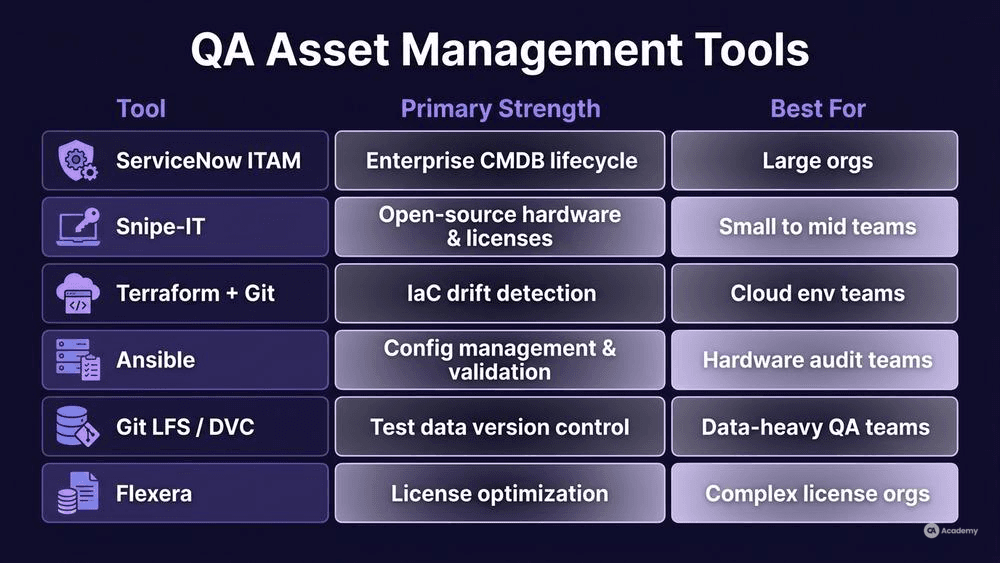
The right tool depends on your team size, budget, and existing ecosystem. Here is a comparison of commonly used options for QA asset management:
Tool | Primary Strength | License Model | Best For |
|---|---|---|---|
ServiceNow ITAM | Enterprise CMDB with full IT asset lifecycle tracking | Commercial SaaS | Large organizations with existing ServiceNow instance |
Snipe-IT | Open-source hardware and license tracking | Open source (self-hosted) | Small to mid-size teams needing a lightweight solution |
Terraform + Git | Infrastructure-as-Code with built-in drift detection | Open source | Teams managing cloud-based test environments |
Ansible | Configuration management and environment state validation | Open source (community) / Commercial (AAP) | Teams needing automated hardware configuration audits |
Git LFS / DVC | Version control for large test data sets | Open source | Teams implementing test data versioning |
Flexera | Software license optimization and compliance | Commercial SaaS | Organizations with complex software license tracking needs |
No single tool covers every asset type. Most mature teams combine a CMDB or asset tracker (for licenses and hardware) with IaC tools (for environments) and version control (for test data).
Real-World Example
⚠️ Disclaimer: The following scenario is an illustrative example based on typical industry patterns. The specific metrics are hypothetical estimates designed to demonstrate realistic outcomes, not measured data from a documented project. They should not be cited as factual benchmarks.
Context
A mid-size fintech company runs a QA department of 25 testers supporting six Scrum teams. Their test infrastructure includes four shared environments, 12 commercial tool licenses, a physical device lab of 30 mobile devices, and approximately 200 test data sets used across regression, integration, and performance testing.
Challenge
The team experienced recurring sprint disruptions: environments were frequently misconfigured because changes were made ad hoc without updating documentation. License expirations caused CI pipeline failures roughly once per quarter. Test data conflicts — two testers modifying the same data set simultaneously — led to flaky test results that consumed investigation time. There was no centralized inventory; knowledge lived in individual team members' heads and scattered Confluence pages.
Solution
The QA Lead implemented a phased asset management program over three months:
- Month 1 — Inventory. Conducted a full hardware configuration audit and built a test environment inventory in Snipe-IT. Catalogued all software licenses with renewal dates and assigned owners.
- Month 2 — Governance. Introduced test data versioning using Git LFS, tagged data sets to release branches, and added data set reservation (checkout/checkin) to prevent concurrent modification. Defined environment change request process requiring documentation updates before any configuration change.
- Month 3 — Automation. Deployed Terraform for environment provisioning with drift detection alerts. Set up automated license expiry notifications 60 and 30 days before renewal.
Results
After two full quarters of operation, the team observed:
- Environment-related test failures dropped by approximately 70%.
- License-caused pipeline interruptions were eliminated entirely in the measured period.
- Test data conflicts decreased by roughly 80%, with the remaining cases caught by the reservation system before they caused flaky results.
- Time spent investigating "works on my environment" discrepancies fell by approximately 60%, freeing testers to focus on exploratory and risk-based testing.
- Onboarding time for new testers decreased noticeably because the asset inventory served as a self-service reference for environment details, tool access, and data set locations.
Key Takeaways
- Start with a simple inventory before adding automation — you need to know what you have before you can govern it.
- Assign individual ownership, not team ownership.
- Integrate asset checks into your existing CI pipeline rather than building a separate monitoring system.
- Quarterly reviews prevent inventory decay and catch assets that should be retired.