



You push a hotfix on Friday afternoon and the deployment sails through. Monday morning, three customer-facing features are broken—features nobody touched. The culprit? A side effect that a well-maintained automated test suite would have caught in minutes. If that scenario sounds painfully familiar, this article is for you. Here you will find a structured approach to building, maintaining, and scaling automated tests across regression, API, and unit layers. The goal is to give you workflows, checklists, and comparison criteria you can put to work the same week you read this.
What Is an Automated Test?
An automated test is a test case executed by software rather than a human tester, where expected outcomes are compared against actual results without manual intervention. ISO/IEC/IEEE 29119-1:2022 defines software testing as a set of activities conducted to facilitate discovery of defects and to evaluate the quality of software artifacts [1]. Automation layers that execution with scripts and frameworks so the same check can be repeated hundreds of times with identical precision.
In practice, an automated test lives as code: a function, a script, or a configuration file that a CI/CD pipeline can trigger on every commit, every merge, or on a schedule. The ISTQB Foundation Level syllabus classifies test execution automation as a core testing activity and emphasizes that the right level of automation shortens feedback loops without replacing the need for human judgment on exploratory or usability concerns [2].
Why It Matters for QA
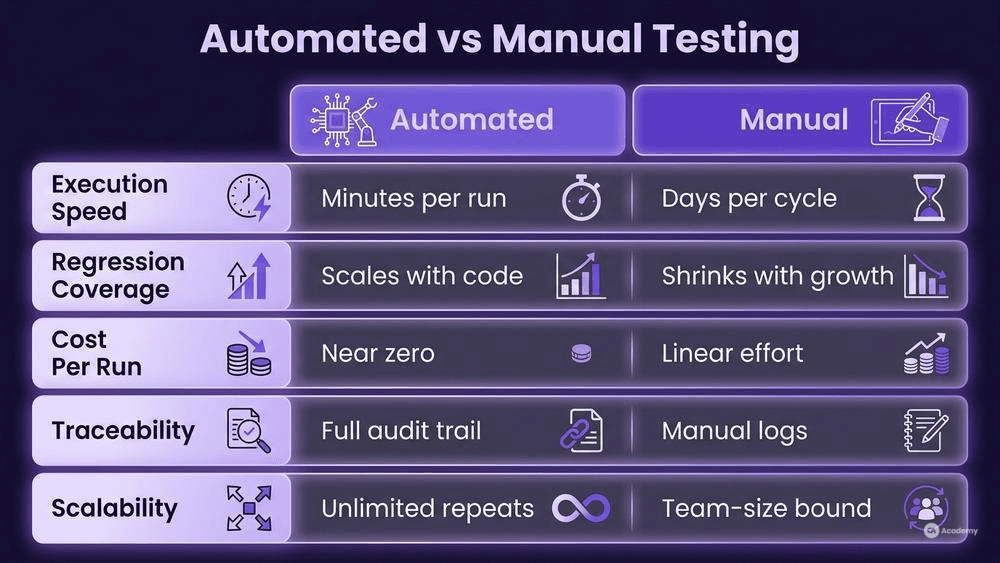
Manual regression runs scale linearly with your codebase. Doubling the feature count roughly doubles the effort—or, more realistically, halves the coverage because nobody doubles the team. Automated tests flip that relationship: the upfront investment in scripted test execution is higher, but each subsequent run is nearly free.
Beyond speed, automation provides traceability. When every test script lives in the same repository as the production code—a common and generally recommended practice—you get an auditable record of what was verified, when, and against which build. That record matters during compliance audits (think ISO/IEC 25010:2023 quality characteristics [3]) and incident post-mortems alike.
How to Automate Tests Step by Step
Prerequisites and Setup
Before writing your first assertion, nail down these foundations:
- Version control. Store test code alongside application code. Branch, review, and merge tests the same way you handle features.
- CI/CD integration. Your pipeline should trigger tests automatically. If it cannot run tests without a human clicking "Go," you have a manual process wearing an automation costume.
- Environment parity. The closer your test environment mirrors production, the fewer false positives you will chase. Container orchestration tools (Docker, Podman) help standardize environments across local, staging, and CI runners.
- Clear scope. Decide which tests belong in which layer—unit, API, or end-to-end—before you start coding. The test automation pyramid (many unit tests, fewer integration tests, fewest UI tests) remains a reliable starting heuristic.
Step 1 — Define the Test Case Automation Scope
List the features under test. Prioritize by risk and change frequency. A payments module that changes every sprint deserves automation before a static "About Us" page. Map each feature to a test type:
Feature area | Recommended layer | Why |
|---|---|---|
Business logic, calculations | Unit test frameworks | Fast, isolated, cheap to maintain |
Service contracts, data flow | API test automation | Validates integration without UI overhead |
Critical user journeys | E2E / UI | Catches rendering and workflow regressions |
Step 2 — Choose Your Frameworks
Pick one framework per layer and standardize. Framework sprawl—three unit runners, two API tools, four assertion libraries—creates maintenance debt that quietly kills automation programs. Section 5 (Tools Comparison) offers side-by-side criteria.
Step 3 — Write Your First Suite
Start small. A single regression test suite covering login, core CRUD, and logout gives you a skeleton to iterate on. Follow the Arrange–Act–Assert pattern:
# Example: pytest unit test for a discount calculator
def test_apply_seasonal_discount():
    # Arrange
    price = 100.00
    discount_rate = 0.15

    # Act
    result = apply_discount(price, discount_rate)

    # Assert
    assert result == 85.00
Keep examples minimal but complete. Specify the language version and framework version in your project's README so anyone can reproduce the run.
Step 4 — Integrate into the Pipeline
Add a test stage to your CI configuration. A stripped-down example in a YAML pipeline:
test:
  stage: test
  script:
    - pytest tests/unit --junitxml=report.xml
    - pytest tests/api --junitxml=api_report.xml
  artifacts:
    reports:
      junit: "*.xml"
Define a quality gate based on risk rather than a fixed pass-rate percentage. A practical policy: fail the pipeline if any release-blocking or critical test fails; remaining failures are triaged and accepted by the release owner. This prevents silent regressions on high-impact paths while letting the team handle lower-severity issues pragmatically.
Step 5 — Monitor and Maintain
Tests are not "write-once" artifacts. Schedule a quarterly review to:
- Remove tests for deprecated features.
- Refactor brittle selectors or hardcoded data.
- Promote manual checks that now have stable automation hooks.
Common Pitfalls — What NOT to Do
Knowing what to avoid often saves more time than knowing what to do. These anti-patterns surface repeatedly in automation programs:
- Automating everything indiscriminately. Not every test justifies the investment. Exploratory and usability checks typically deliver more value when performed manually.
- Ignoring flaky tests. A test that passes 90 % of the time erodes trust in the entire suite. Quarantine flaky tests immediately, then investigate root causes—common culprits include race conditions, shared state, and network timeouts. Fix or remove them; do not let them sit in quarantine indefinitely.
- Hard-coding test data. Embedding IDs, dates, or environment-specific URLs creates tests that only work on your machine. Use configuration files, fixtures, or data factories instead.
- Skipping code review for tests. Test code is production code. Review it with the same rigor: naming, structure, readability, and maintenance cost all matter.
- Treating automation as a silver bullet. Automation accelerates scripted test execution of known scenarios. It does not replace risk analysis, test design, or the judgment a skilled tester brings to ambiguous requirements.
Best Practices for Sustainable Test Case Automation
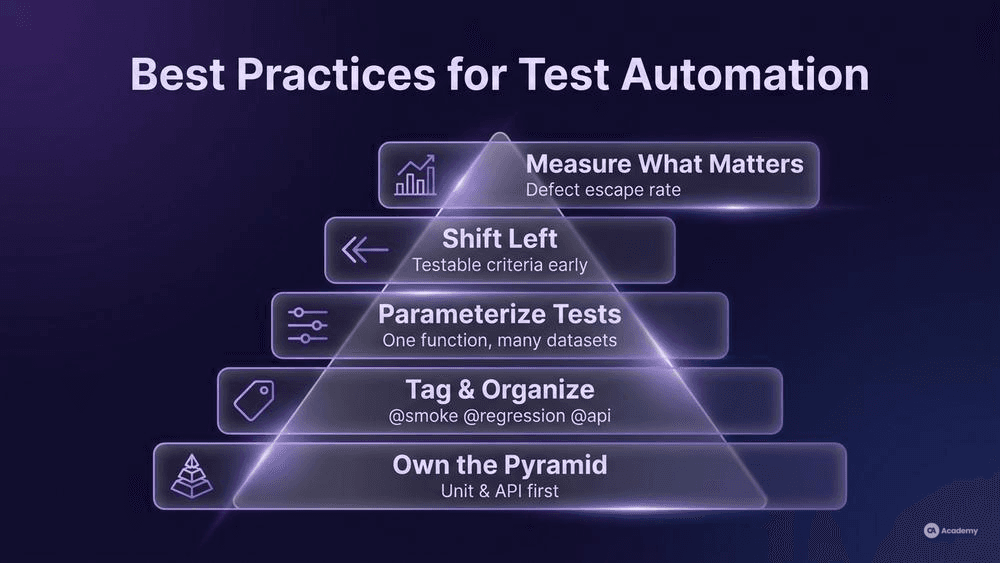
- Own the pyramid. Keep the bulk of your automated tests at the unit and API layers. UI tests are valuable for critical paths but expensive to maintain.
- Tag and organize. Use tags (
@smoke,@regression,@api) so you can run targeted regression test suites per pipeline stage. Run smoke tests on every commit; run the full regression nightly or before release. - Parameterize. Most unit test frameworks support parameterized tests. One test function with ten data sets is easier to maintain than ten near-identical functions.
- Shift left. Involve testers in story refinement. When acceptance criteria are testable before development starts, test case automation becomes straightforward rather than an afterthought.
- Measure what matters. Track defect escape rate (bugs found in production that automation should have caught) rather than vanity metrics like total test count. A suite of 5,000 tests that misses critical regressions is less valuable than 500 well-targeted checks.
- Version your test data. Store seed data, mock responses, and fixture files in version control. When a test breaks, you need to know whether the code changed or the data changed.
Tools Comparison
The table below compares widely used frameworks across the three automation layers. Your choice should depend on your tech stack, team skills, and integration requirements.
Tool | Layer | Language(s) | Key strength | Consideration |
|---|---|---|---|---|
pytest | Unit / API | Python | Fixture system, plugin ecosystem | Python-only; not ideal for JVM shops |
JUnit 5 | Unit | Java / Kotlin | Deep IDE integration, parameterized tests | JVM-centric |
Jest | Unit | JavaScript / TypeScript | Zero-config for JS projects, snapshot testing | Frontend-focused defaults |
Postman / Newman | API | JavaScript (DSL) | Visual test builder, CLI runner for CI | Can become hard to maintain at scale without code-based structure |
REST Assured | API | Java | Fluent DSL for HTTP assertions | Requires Java ecosystem knowledge |
Cypress | E2E / UI | JavaScript | Fast in-browser execution, time-travel debugging | Chromium-family focus; cross-browser support maturing |
Playwright | E2E / UI | JS, Python, Java, C# | Multi-browser, auto-wait, codegen | Newer community; fewer third-party plugins than Selenium |
Selenium WebDriver | E2E / UI | Multiple | Largest community, broadest browser support | Higher maintenance overhead for selectors and waits |
Tip: Start with one tool per layer. You can always expand later, but consolidation keeps maintenance manageable and onboarding faster.
Real-World Example
⚠️ Disclaimer: The following scenario is an illustrative example based on typical industry patterns. The specific metrics are hypothetical estimates designed to demonstrate realistic outcomes, not measured data from a documented project. They should not be cited as factual benchmarks.
Context
A mid-size fintech team (six developers, two QA engineers) ships a payments platform with bi-weekly releases. The team runs manual regression before each release, consuming roughly three days of tester effort per cycle.
Challenge
As the feature set grew, the manual regression window expanded beyond the sprint boundary. Testers spent most of their time re-verifying stable functionality, leaving almost no capacity for exploratory testing of new features. Escaped defects in production increased, and customer-reported issues started arriving within hours of each release.
Solution
The team implemented a three-layer automated test strategy:
- Unit tests (pytest): Developers wrote unit tests for all business-logic modules—discount calculations, fee structures, currency conversions. Coverage targets were set per module based on risk assessment.
- API tests (REST Assured): QA engineers automated the top 30 API contracts covering payment initiation, status queries, and webhook callbacks.
- E2E smoke suite (Playwright): A focused set of 12 end-to-end scenarios covering the most critical user journeys: onboarding, first payment, refund, and account closure.
All tests were integrated into the CI pipeline. Unit and API tests ran on every pull request; the E2E smoke suite ran nightly and before each release candidate.
Results (Illustrative Estimates)
- Regression cycle time: Dropped from three days of manual effort to approximately 45 minutes of automated execution plus one hour of results review.
- Defect escape rate: Reduced by an estimated 70 %, as regressions in stable modules were caught before merge.
- Tester capacity for exploratory work: Increased from roughly 10 % to roughly 60 % of available sprint time.
- Maintenance overhead: The team dedicated approximately four hours per sprint to test maintenance—updating selectors, refreshing test data, and removing obsolete checks.
Key Takeaways
- Automating the stable core freed human testers for higher-value exploratory and risk-based testing.
- Starting with API-level automation delivered the best return per test, since API tests run faster and break less often than UI tests.
- Dedicated maintenance time prevented suite decay—a step many teams skip, leading to abandoned automation efforts.