



You rename a single button ID during a UI sprint, and suddenly forty Selenium tests turn red. The fix takes ten minutes per test, scattered across files nobody fully owns. The page object model solves this exact problem by giving every screen in your application a dedicated class that owns its locators and behaviours, so a locator change typically happens in exactly one place and every test that consumes that class picks up the change automatically. This article walks you through the pattern's structure, implementation steps, pitfalls to avoid, and how it supports long-term test maintainability. Whether you work in Selenium, Cypress, or Playwright, the principles here translate directly into your daily automation work.
What Is the Page Object Model?
The page object model (POM) is a design pattern that creates a separate class—or module—for each page or significant component of your application under test. Each class encapsulates the UI element abstraction (locators, selectors) and the actions a user can perform on that page. Your test scripts then call human-readable methods like loginPage.enterCredentials(user, pass) instead of scattering raw findElement calls throughout the suite.
The ISTQB Foundation Level syllabus lists maintainability as one of the core objectives of structured test design [1]. POM directly supports that objective by enforcing a clean boundary between what a test verifies and how it interacts with the interface.
Why It Matters for QA
Without test code separation, a single UI refactor often forces edits across many test files—a pattern sometimes called "shotgun surgery." Teams that adopt POM typically report faster maintenance cycles because:
- One class, one page. A locator change is usually isolated to a single file.
- Readable tests. Reviewers see business intent, not CSS selectors.
- Reusable steps. Shared actions (login, navigation, search) live in one place and are consumed everywhere.
The ISO/IEC 25010 product quality model defines maintainability through sub-characteristics like modularity, reusability, and modifiability [2]. POM maps almost one-to-one onto those sub-characteristics, which is why it appears in nearly every test architecture discussion.
How to Implement a Page Object Model Step by Step
Prerequisites and Setup
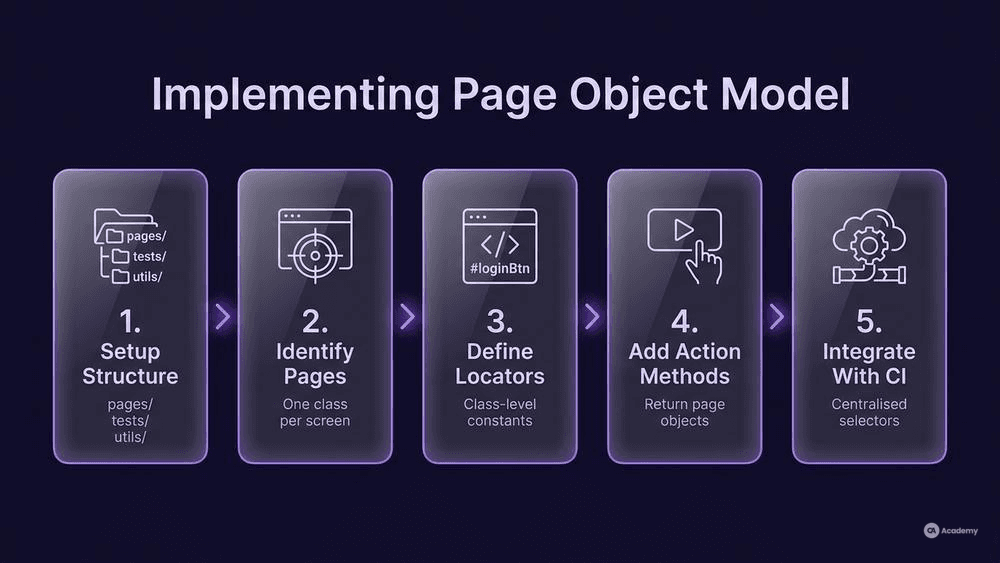
Before you write your first page class, make sure you have:
- A working WebDriver or browser-automation binding (Selenium, Playwright, Cypress).
- A test runner configured (pytest, JUnit, Mocha, NUnit—whatever fits your stack).
- A project folder structure that separates
pages/,tests/, and optionallycomponents/orutils/.
A minimal folder layout in a Python–Selenium project typically looks like this:
` project/ ├── pages/ │ ├── loginpage.py │ └── dashboardpage.py ├── tests/ │ ├── testlogin.py │ └── testdashboard.py └── conftest.py `
Step 1 — Identify Pages and Components
Walk through your application's key user flows. Each distinct screen—or a reusable component like a navigation bar—becomes its own class. Over-granularity is better than under-granularity; you can always merge later, but splitting a bloated page class mid-project is painful.
Step 2 — Define Locators Inside the Class
Store every selector as a class-level constant or attribute. In most implementations this means a tuple or a string at the top of the class body. Keeping locators together makes audits simple: when the UI changes, you open one file and scan the top section.
`python
pages/login_page.py
from selenium.webdriver.common.by import By
class LoginPage:
Locators
USERNAME = (By.ID, "username") PASSWORD = (By.ID, "password") SUBMIT = (By.CSS_SELECTOR, "button[type='submit']") `
Step 3 — Add Action Methods
Each public method represents a user action. Methods should return either self (for chaining on the same page) or a new page object when the action navigates away.
`python def init(self, driver): self.driver = driver
def enterusername(self, user): self.driver.findelement(*self.USERNAME).send_keys(user) return self
def enterpassword(self, pwd): self.driver.findelement(*self.PASSWORD).send_keys(pwd) return self
def clicksubmit(self): self.driver.findelement(*self.SUBMIT).click() from pages.dashboard_page import DashboardPage return DashboardPage(self.driver) # navigates to a new page `
Step 4 — Write Tests That Consume the Page Object
Your test file should read almost like a specification. Ideally, tests should not touch raw selectors or WebDriver calls directly.
`python
tests/test_login.py
def testvalidlogin(browser): dashboard = ( LoginPage(browser) .enterusername("qalead") .enterpassword("s3cure!") .clicksubmit() ) assert dashboard.iswelcomebanner_visible() `
Step 5 — Integrate With CI
Wire the suite into your pipeline (GitHub Actions, GitLab CI, Jenkins). Because page classes centralise locators, flaky failures caused by stale selectors tend to decrease, which in turn makes your CI signal more trustworthy over time.
Common Pitfalls
- God page objects. If a page class exceeds roughly 300 lines, split it into component objects (header, sidebar, modal).
- Assertions inside page classes. Keep assertions in test files. Page objects describe capability, not expectation.
- Hard-coded waits. Use explicit waits tied to expected conditions, not
time.sleep(). Hard-coded sleeps mask real timing issues and inflate run times. - Leaking driver details. Exposing the raw driver through page-object getters invites callers to bypass the abstraction.
Best Practices for Maintainable Test Architecture
- Name methods after user intent, not HTML.
add_item_to_cart()beatsclick_btn_3(). - Return page objects from navigation methods. This keeps flow type-safe and self-documenting.
- Use a base page class. Common waits, screenshot helpers, and logging belong in a shared parent.
- Version-lock your selectors strategy. Prefer data-test attributes when you can negotiate them with developers; they tend to survive CSS refactors better than class-based selectors.
- Review page objects in code review. Treat them as a first-class part of the codebase, not throwaway glue.
- Consider the WebDriver Page Factory pattern (Java / C#). It auto-initialises elements at class load, reducing boilerplate—though it can obscure lazy-loading concerns if you are not careful.
Trade-offs to Consider
POM is not universally the optimal choice. If your test suite has fewer than about ten tests against a static UI, the overhead of separate classes may not pay for itself. Similarly, component-based front-ends (React, Angular) sometimes pair more naturally with a "component object" or "screen-play" pattern that composes smaller pieces rather than mapping to full pages.
When POM Might Not Be the Best Fit
- API-only test suites. POM is a UI pattern; it adds no value to purely API-driven tests.
- Highly dynamic single-page apps with micro-front-ends. In these cases, a component-object pattern or the Screenplay pattern can offer better modularity.
- Disposable spike tests. If you are writing a quick proof of concept you plan to discard within a sprint, the up-front investment in page classes may not be justified.
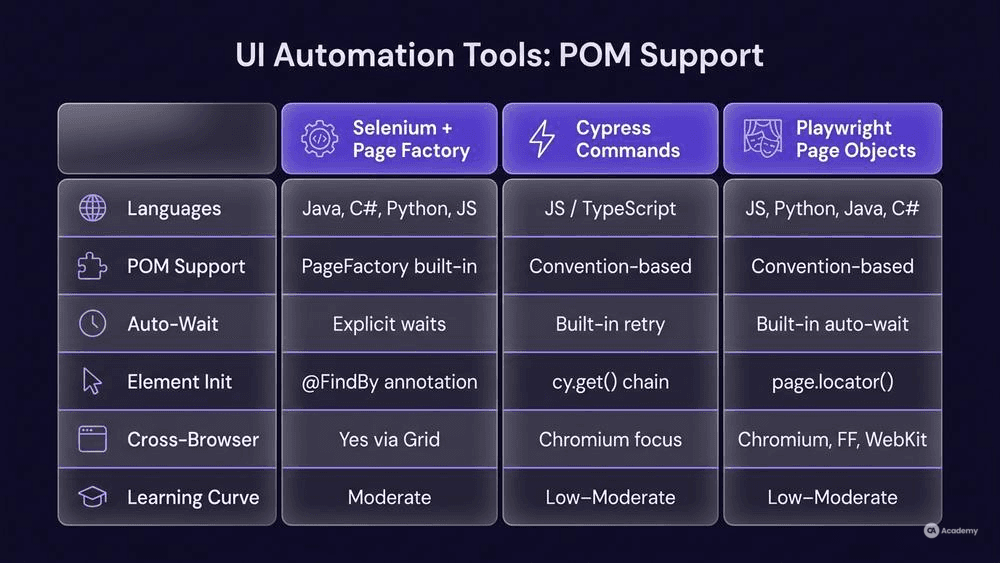
Tools Comparison for UI Element Abstraction
Feature | Selenium + Page Factory | Cypress Custom Commands | Playwright Page Objects |
|---|---|---|---|
Language support | Java, C#, Python, JS, Ruby | JavaScript / TypeScript | JS/TS, Python, Java, C# |
Built-in POM support |
| No built-in pattern; convention-based | No built-in pattern; convention-based |
Auto-wait mechanism | Explicit waits required | Built-in auto-retry | Built-in auto-wait |
Element initialisation | Annotation-driven ( | Chainable queries ( | Locator API ( |
Cross-browser execution | Yes (via Grid or cloud) | Chromium-family focus (experimental WebKit/FF) | Chromium, Firefox, WebKit |
Typical learning curve | Moderate | Low–moderate | Low–moderate |
All three ecosystems support the page object model; the difference lies in how locators are declared and how waits are handled. Choose based on your team's language, browser matrix, and existing infrastructure rather than pattern compatibility alone.
Real-World Example
⚠️ Disclaimer: The following scenario is an illustrative example based on typical industry patterns. The specific metrics are hypothetical estimates designed to demonstrate realistic outcomes, not measured data from a documented project. They should not be cited as factual benchmarks.
Context
A mid-size fintech team maintains a regression suite of roughly 600 Selenium-based UI tests across three web applications. Tests are written inline—selectors and assertions live in the same methods—and the suite runs nightly in Jenkins.
Challenge
After a front-end framework migration from jQuery to React, the team faced a wave of broken selectors. On average, each developer spent several hours per sprint patching test files rather than writing new coverage. Pipeline confidence dropped because the nightly run routinely reported failures caused by stale locators, not real defects.
Solution
The team adopted the page object model in three phases over two sprints:
- Audit. Catalogued every unique page and reusable component, identifying roughly 35 page objects needed.
- Refactor. Migrated locators into page classes, starting with the highest-churn screens (login, dashboard, transaction flow).
- Enforce. Added a linting rule that flagged any
findElementcall outside apages/directory, preventing regressions to the old style.
They also negotiated data-testid attributes with front-end developers, which further decoupled selectors from styling changes.
Results (Illustrative Estimates)
- Test maintenance effort decreased by an estimated 60 % per sprint.
- Selector-related false failures dropped by roughly 75 %, improving pipeline signal quality.
- New test creation became faster because authors reused existing page methods rather than re-discovering locators.
Key Takeaways
- Start the migration with the highest-churn pages; the payoff is immediate.
- Pair POM adoption with a
data-testidstrategy for maximum decoupling. - Enforce the pattern through code review and static-analysis rules, not just documentation.
- Even partial adoption (migrating the top 20 % of pages by churn) can yield a meaningful reduction in maintenance overhead.