



You have a green test suite locally. You push to CI. Half the tests fail. The error messages mention session timeouts, stale elements, and driver crashes — yet the same tests pass on your machine every time. If this sounds familiar, you are not alone. The root cause often lies not in your test logic but in a fundamental misunderstanding of how Web Driver actually operates beneath the surface. This article gives you a practical, protocol-level understanding of WebDriver so your QA teams can build automation that holds up under real-world pressure. You will walk away with a clear mental model of the Selenium WebDriver API, session lifecycle, and infrastructure patterns that prevent the most common CI failures.
What Is Web Driver?
Web Driver is a remote-control interface that lets external programs send commands to a browser and receive results back. Instead of injecting JavaScript into the page (the way older tools worked), WebDriver communicates with the browser through a standardized HTTP-based protocol defined by the W3C WebDriver specification [1].
In practical terms, when your Selenium test calls driver.findElement(...), the Selenium client library translates that call into an HTTP request, sends it to a driver server (such as ChromeDriver or GeckoDriver), and that server forwards the instruction to the browser engine through its internal DevTools or Marionette interface.
Why It Matters for QA
Understanding this layered architecture is what separates teams that fight flaky tests from teams that prevent them. When you know that every single interaction is an HTTP round-trip serialized as a JSON payload, you start to see why network latency, driver version mismatches, and improper session handling cause the majority of intermittent failures.
The ISTQB Foundation Level syllabus defines test automation as requiring an understanding of both the tool and the system under test [2]. WebDriver sits squarely at that intersection — it is the tool, and the browser is the system. If you understand only one side, your automation will frequently break in ways that are difficult to diagnose.
How the Browser Automation Protocol Works
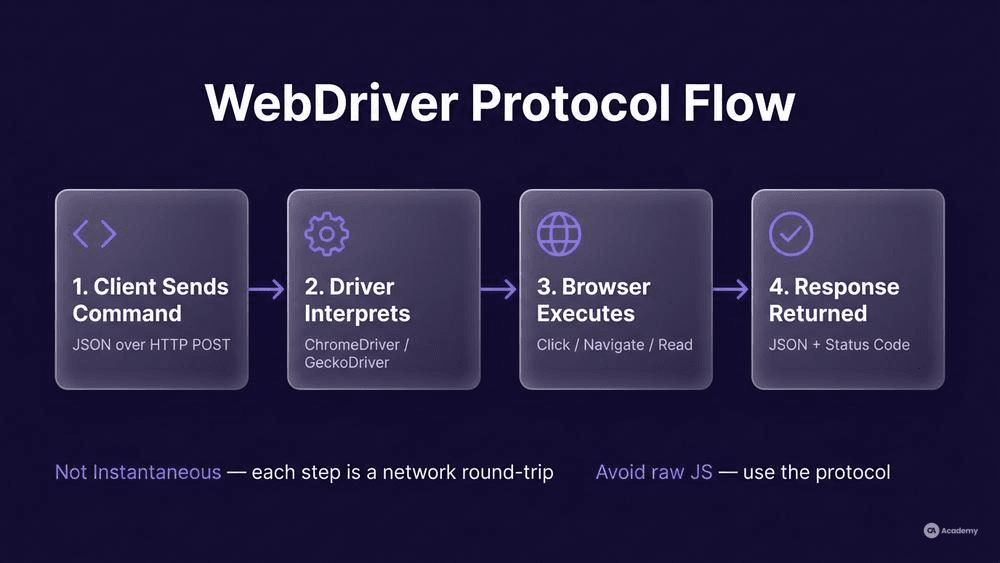
The W3C WebDriver spec defines a client-server architecture using standard HTTP methods (POST, GET, DELETE) against a set of REST-like endpoints [1]. Here is the simplified flow:
- Client sends a command — Your test framework (Selenium, WebdriverIO, etc.) serializes a command into JSON and sends an HTTP request to the remote driver server.
- Driver server interprets the command — ChromeDriver, GeckoDriver, or EdgeDriver receives the request and translates it into browser-specific internal calls.
- Browser executes the action — The browser engine performs the action (click, navigate, read element) and returns a result.
- Driver server returns the response — The result travels back as an HTTP response with a JSON body, including any error codes defined by the W3C spec.
This is why you often see "localhost:9515" or similar addresses in your logs — that is the HTTP endpoint of the driver server listening for commands on an ephemeral port.
What NOT to Do
- Do not assume commands are instantaneous. Every interaction is a network round-trip. On a remote Selenium Grid, latency multiplies. Explicitly account for this in your wait strategies rather than assuming local-machine speed.
- Do not bypass the protocol with raw JavaScript unless necessary. Executing
driver.executeScript(...)for every action defeats the purpose of a standardized browser automation protocol and makes your tests fragile to DOM changes.
Driver Session Management: Start to Teardown
A WebDriver session is the fundamental unit of browser automation. When you call new ChromeDriver() or equivalent, the following happens under the hood:
- Session creation request — The client sends a
POST /sessionwith a JSON body describing desired capabilities (browser name, version, platform, options). - Driver server launches the browser — A new browser process starts with the requested configuration.
- Session ID is returned — The response includes a unique session ID. Every subsequent command references this ID.
- Commands execute within that session — All navigation, element interaction, and assertions operate within this isolated browser context.
- Session deletion — Calling
driver.quit()sends aDELETE /session/{id}request, which closes the browser and releases resources.
Why Session Hygiene Matters
Each active session consumes memory, CPU, and sometimes GPU resources. In CI environments, orphaned sessions — those not properly closed — accumulate and degrade performance across the pipeline. This is frequently the hidden cause when a CI machine becomes slower over the course of a day.
ISO/IEC/IEEE 29119-2 defines test execution as a process requiring explicit setup and teardown activities [3]. Driver session management is the literal implementation of that principle in automation.
What NOT to Do
- Never reuse sessions across independent test classes. Shared state between tests is among the most common sources of test order dependencies and false positives.
- Never rely on garbage collection to close sessions. Always call
driver.quit()in afinallyblock or@AfterEachhook. Relying on process termination to clean up frequently leaves browser processes running in headless CI environments. - Never hardcode a session timeout and forget about it. Set explicit session timeouts in your capabilities, and make sure your CI pipeline's job timeout exceeds the longest possible test execution time plus a cleanup buffer.
Setting Up WebDriver for Reliable Automation
Here is a concrete setup checklist your QA teams can apply immediately:
Prerequisites
- Browser installed — Match the exact major version between browser and driver (e.g., Chrome 126 requires ChromeDriver 126).
- Driver binary available — Use a driver management tool (Selenium Manager, WebDriverManager for Java) rather than manually downloading binaries.
- Network access — If using a remote grid, confirm the client machine can reach the hub's HTTP endpoint.
Recommended Configuration Pattern
`java // Java + Selenium 4 — minimal reliable setup ChromeOptions options = new ChromeOptions(); options.addArguments("--headless=new"); options.addArguments("--no-sandbox"); options.addArguments("--disable-dev-shm-usage");
WebDriver driver = new ChromeDriver(options); driver.manage().timeouts().implicitlyWait(Duration.ofSeconds(0)); driver.manage().timeouts().pageLoadTimeout(Duration.ofSeconds(30)); `
Note: setting implicit wait to zero is intentional. Mixing implicit and explicit waits leads to unpredictable timeout behavior. Use explicit waits (WebDriverWait) exclusively for element readiness checks [4].
ChromeDriver Configuration for CI
When running in containers or headless CI agents, Chrome needs specific flags to avoid resource issues:
--disable-dev-shm-usageprevents crashes caused by limited/dev/shmin Docker.--no-sandboxis required inside containers running as root (though running as a non-root user is strongly preferred).--headless=newuses Chrome's updated headless mode, which behaves more consistently with headed mode than the legacy--headlessflag [5].
Best Practices for Stable WebDriver Infrastructure
Version Pinning and Drift Prevention
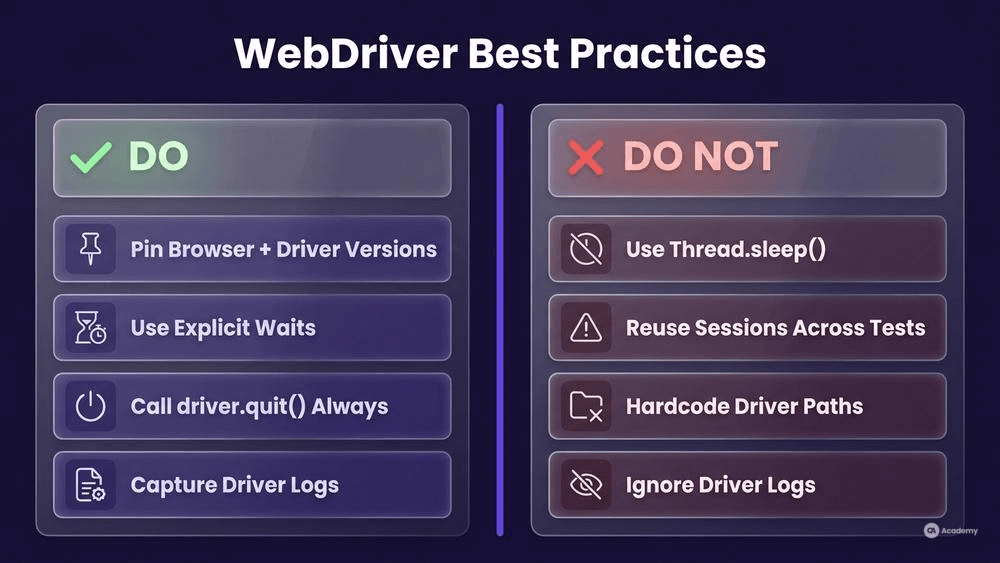
Browser auto-updates in CI are among the most common causes of "it worked yesterday" failures. Pin both the browser and driver versions in your CI configuration. Tools like Google's Chrome for Testing project provide stable, versioned browser downloads specifically for automation [5].
Wait Strategies
Strategy | When to Use | When NOT to Use |
|---|---|---|
Explicit wait ( | Element depends on async operation | Never as a blanket default |
Fluent wait | Polling with custom interval and exception handling | Simple presence checks |
| Almost never — debugging only | Production test code |
Resource Cleanup Patterns
- Use
try/finallyor framework hooks (@AfterEach,afterEach()) to guaranteedriver.quit()runs. - In parallel execution, give each thread its own driver instance. Sharing a
WebDriverobject across threads leads to race conditions in session commands. - Monitor your CI agents for orphaned browser processes. A simple post-job script that kills stale Chrome/Firefox processes can prevent resource exhaustion.
What NOT to Do
- Do not use `Thread.sleep()` in test code. It masks timing problems and makes your suite slower. Use explicit waits tied to specific conditions instead.
- Do not hardcode absolute file paths to driver binaries. Use environment variables or driver management libraries. Hardcoded paths break the moment tests run on a different machine or OS.
- Do not ignore driver logs. ChromeDriver and GeckoDriver produce verbose logs that reveal the root cause of session failures. Capture them as CI artifacts.
Tools Comparison
Feature | Selenium WebDriver | Playwright | Cypress |
|---|---|---|---|
Protocol | W3C WebDriver (HTTP) | Chrome DevTools Protocol (CDP) + custom | In-browser execution engine |
Language support | Java, Python, C#, Ruby, JS | JS/TS, Python, Java, .NET | JavaScript / TypeScript only |
Browser coverage | Chrome, Firefox, Edge, Safari | Chromium, Firefox, WebKit | Chromium-family, Firefox (limited) |
Parallel execution | Via Grid or third-party | Built-in (contexts) | Via CI parallelization |
Mobile support | Via Appium (W3C WebDriver) | Experimental | None |
W3C standard compliance | Full (it defines the spec) | Partial (CDP-based) | Not applicable |
Key takeaway: Selenium WebDriver remains the only framework fully compliant with the W3C WebDriver spec [1], which matters for cross-browser coverage and long-term interoperability. Playwright offers faster execution for Chromium-heavy pipelines. The right choice depends on your team's browser matrix and language requirements — there is no universally superior option.
Real-World Example
⚠️ Disclaimer: The following scenario is an illustrative example based on typical industry patterns. The specific metrics are hypothetical estimates designed to demonstrate realistic outcomes, not measured data from a documented project. They should not be cited as factual benchmarks.
Context
A mid-sized e-commerce team runs approximately 1,200 Selenium UI tests across Chrome, Firefox, and Edge. Their CI pipeline uses a shared Selenium Grid with 10 nodes. Test execution takes roughly 45 minutes per full run, and the team observes a flaky test rate that they consider unacceptably high.
Challenge
Flaky failures cluster around three patterns: session creation timeouts during peak CI usage, stale element exceptions on dynamically rendered pages, and version mismatch errors after browser auto-updates on Grid nodes.
Solution
The team implements three changes based on WebDriver best practices:
- Version pinning — They replace auto-updating browsers on Grid nodes with Chrome for Testing [5] and pin the driver version to match. They add a weekly scheduled job to update both in lockstep.
- Session management overhaul — Every test class gets an explicit
@AfterEachthat callsdriver.quit()and a post-suite cleanup script that terminates orphaned processes. They also set ase:sessionTimeoutcapability to prevent zombie sessions. - Wait strategy refactoring — They replace all
Thread.sleep()calls with explicitWebDriverWaitconditions and add a Fluent Wait wrapper for AJAX-heavy pages.
Results (Illustrative Estimates)
- Flaky test rate drops by an estimated 60–75%, with the majority of eliminated failures traced to version drift and improper session cleanup.
- Full suite execution time decreases by roughly 20–30% due to the removal of
Thread.sleep()calls and faster session teardown. - CI node resource utilization stabilizes, reducing the need for ad-hoc node restarts from daily occurrences to rare events.
Key Takeaways
- Most flakiness attributed to "WebDriver issues" frequently stems from version drift, resource leaks, or timing assumptions rather than protocol-level bugs.
- Investing in session hygiene and version management often yields a larger stability improvement than rewriting test logic.
- A structured approach to WebDriver infrastructure — as defined in ISO/IEC/IEEE 29119-2's test environment requirements [3] — prevents problems that are expensive to debug after the fact.