



Your tests pass locally and fail on staging. The staging database has stale data from three sprints ago. A developer "quickly fixed something" on the shared test server, and now nobody can reproduce the bug your client reported. If any of this sounds familiar, you have a test environment problem—not a test quality problem. This article walks you through a practical, repeatable approach to test environment setup that eliminates these issues. You will get checklists, configuration examples, and a clear process you can adapt to your own stack. By the end, you will have a playbook for environments that behave like production and stay that way.
What Is a Test Environment?
A test environment is a configured combination of hardware, software, network topology, and test data that provides a controlled setting for executing test procedures and evaluating results. The ISO/IEC/IEEE 29119-1 standard identifies the test environment as one of the foundational elements of the organizational test process, distinct from the system under test itself [1]. In the ISTQB Foundation Level syllabus, the test environment is defined as an environment containing the hardware, instrumentation, simulators, software tools, and other support elements needed to conduct a test [2].
Why It Matters for QA
When a test fails, the root cause is often not the test itself—it is the environment. Mismatched library versions, missing services, incorrect network configuration, or stale data silently invalidate your results. You end up debugging infrastructure instead of verifying functionality. A well-managed test environment setup separates legitimate defects from environmental noise, which is exactly the distinction your Scrum team needs when deciding whether to ship.
Why Your Test Environment Setup Determines Test Reliability
Think of your test environment as the lab bench in a chemistry experiment. If the bench is contaminated, your experiment's results mean nothing—regardless of how precise your instruments are.
ISO/IEC/IEEE 29119-2 explicitly identifies environment preparation as a prerequisite activity within the test execution process [3]. Skipping or under-investing in that preparation creates a cascading failure: flaky tests erode trust, developers stop reading test reports, and eventually nobody catches the regression that reaches production.
A production-like setup does not mean an exact production clone (that is often neither practical nor affordable). It means the environment matches production in every dimension that affects your test scope: OS version, service dependencies, network configuration, data schema, and access control. You deliberately choose where to deviate and document those choices.
How to Build a Production-Like Setup Step by Step
Prerequisites
Before provisioning anything, you need three artifacts:
- Environment specification document. A single-source-of-truth listing OS, middleware, service versions, ports, credentials, and external dependencies. ISO/IEC/IEEE 29119-3 defines the test environment requirements as part of the test plan documentation [4].
- Version-controlled config repository. Every configuration file, environment variable, and provisioning script lives in Git. No exceptions.
- Designated environment owner. One person (or rotating role) who approves changes and maintains the baseline. Without ownership, environments drift within days.
Step 1: Define Environment Tiers
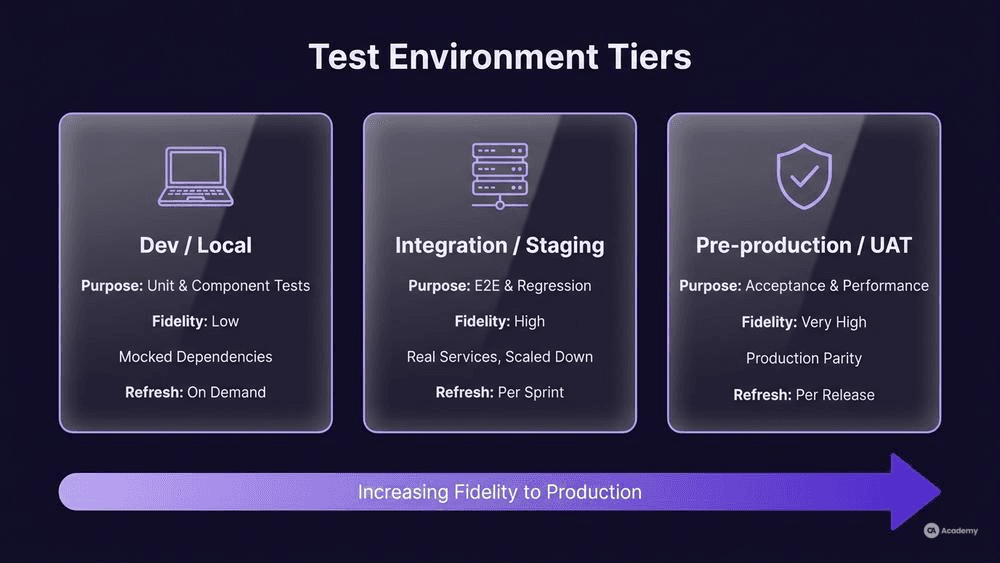
Most teams benefit from three tiers aligned to their workflow:
Tier | Purpose | Fidelity to Production | Refresh Frequency |
|---|---|---|---|
Dev/Local | Unit and component tests | Low (mocked dependencies) | On demand |
Integration/Staging | End-to-end, regression, API tests | High (real services, scaled down) | Per sprint or per build |
Pre-production/UAT | Acceptance, performance, security tests | Very high (production parity) | Per release candidate |
A common mistake is treating staging as a "mini-production" without explicitly deciding which production characteristics to replicate and which to intentionally omit. Document those decisions in your environment specification.
Step 2: Automate Virtual Machine Instances and Container Provisioning
Manual server setup is fragile and unrepeatable. Use Infrastructure as Code (IaC) to provision your virtual machine instances or containers. Here is a minimal Terraform snippet for a staging VM:
`hcl resource "awsinstance" "staging" { ami = "ami-0c55b159cbfafe1f0" # Match production AMI instancetype = "t3.medium"
tags = { Name = "staging-test-env" Environment = "staging" ManagedBy = "terraform" } } `
The key principle: your staging environment config should be a parameterized version of your production config, not a separate, hand-maintained artifact. When production changes, staging changes automatically through the same pipeline.
Step 3: Build Idempotent Data Setup Scripts
Test data is where most environment setups quietly break. Your data setup scripts should be:
- Idempotent. Running them twice produces the same state, not duplicate records.
- Versioned. Tagged alongside the application version they support.
- Scoped. Each test suite seeds only the data it needs, then cleans up after itself.
A practical pattern: maintain a seed/ directory in your test repository with SQL or API scripts that create known-good datasets. Run them as a pipeline step before test execution, not as a manual task someone remembers to do.
Step 4: Lock Down Network Configuration
Network-related test failures are particularly difficult to diagnose because they present as timeouts, connection resets, or intermittent errors rather than clear failures. Your staging network configuration should replicate:
- Firewall rules and security groups
- DNS resolution (use internal DNS, not hardcoded IPs)
- TLS/SSL certificates (use staging certificates, but same CA chain)
- Service mesh or proxy configuration, if applicable
If your production environment uses a VPN, load balancer, or API gateway, your staging environment should use equivalent components—or you need to explicitly accept the risk of missing network-dependent defects.
Step 5: Integrate Environment Provisioning into CI/CD
Your environment setup is only reliable if it runs automatically. Add environment provisioning as a pipeline stage:
- Provision → Terraform/Ansible creates or resets the environment
- Deploy → Application artifact is deployed to the fresh environment
- Seed → Data setup scripts populate test data
- Test → Test suites execute
- Report → Results are published
- Teardown (optional) → Ephemeral environments are destroyed after the run
This sequence ensures every test run starts from a known baseline, eliminating "it worked yesterday" conversations.
Best Practices for Sustainable Environments
Treat environment config as production code. Apply code review, branching, and CI validation to your infrastructure scripts with the same rigor you apply to application code.
Tag and version environments alongside releases. When investigating a production bug from two weeks ago, you should be able to reconstruct the exact environment that existed at that release point.
Monitor environment health proactively. A simple health-check endpoint (or script) that validates service availability, database connectivity, and disk space can catch drift before it corrupts a test run.
Rotate credentials and secrets regularly. Use a secrets manager (HashiCorp Vault, AWS Secrets Manager, Azure Key Vault) rather than hardcoded values in config files. Hardcoded credentials in test environments tend to leak into repositories and persist indefinitely.
Limit manual access to shared environments. If anyone on the team can SSH into staging and modify files, you will eventually lose environment integrity. Gate manual changes behind a change request process, even a lightweight one.
Tools Comparison
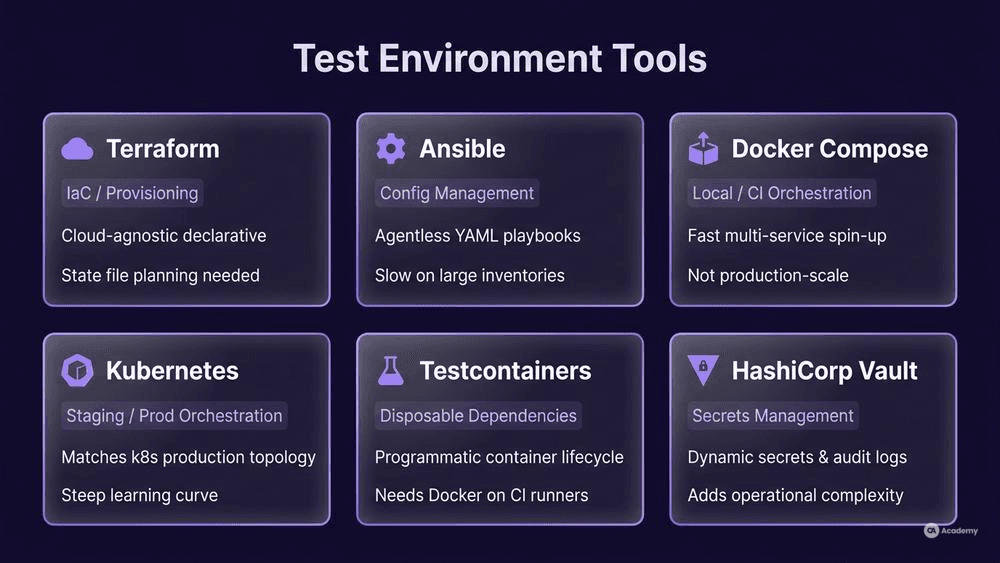
Tool | Category | Strength | Consideration |
|---|---|---|---|
Terraform | IaC / Provisioning | Cloud-agnostic, declarative state management | State file management requires planning |
Ansible | Configuration Management | Agentless, readable YAML playbooks | Can be slow on large inventories |
Docker Compose | Container Orchestration (local/CI) | Simple multi-service setup, fast spin-up | Not suited for production-scale simulations |
Kubernetes (k8s) | Container Orchestration (staging/prod) | Matches production topology when production runs on k8s | Steep learning curve, overkill for small teams |
Testcontainers | Disposable Test Dependencies | Programmatic container lifecycle in test code | Requires Docker daemon on CI runners |
HashiCorp Vault | Secrets Management | Dynamic secrets, audit logging | Adds operational complexity |
Choose based on your production stack. If production runs on Kubernetes, your staging should too. If production runs on bare-metal VMs, Terraform plus Ansible is typically the most practical combination.
Real-World Example
⚠️ Disclaimer: The following scenario is an illustrative example based on typical industry patterns. The specific metrics are hypothetical estimates designed to demonstrate realistic outcomes, not measured data from a documented project. They should not be cited as factual benchmarks.
Context
A mid-size fintech team (8 developers, 2 QA engineers) runs a microservices architecture with 12 services, a PostgreSQL database, and a Redis cache. Their test suite includes 400 automated integration tests that run against a shared staging environment.
Challenge
The staging environment was provisioned manually six months ago and had since accumulated configuration drift: two services were running older versions, the database schema was one migration behind, and network security groups had been modified by a developer troubleshooting a connectivity issue. The team was spending roughly 30% of sprint time investigating test failures that could not be reproduced locally.
Solution
The team implemented a three-part approach:
- Codified the environment specification into a Terraform + Ansible repository, treating staging environment config as versioned infrastructure.
- Created idempotent data setup scripts that rebuilt the test database from scratch in under 90 seconds, run as a CI pipeline stage before every test execution.
- Implemented ephemeral test environments for feature branches using Docker Compose, reserving the shared staging environment for release-candidate validation only.
Results (Illustrative)
- Environment-related false failures dropped from approximately 30% of test runs to roughly 5%.
- Average investigation time per flaky test decreased by an estimated 70%.
- The team reclaimed an estimated 1.5 days per sprint previously lost to environment debugging.
- Mean time to provision a new test environment went from roughly 4 hours (manual) to approximately 12 minutes (automated).
Key Takeaways
- Configuration drift is gradual and invisible until it corrupts test results. Automated provisioning prevents it entirely.
- Ephemeral environments per feature branch eliminate contention on shared resources.
- Data setup scripts are as important as the infrastructure itself—stale data causes as many false failures as misconfigured services.
What Not to Do
Knowing what to avoid can save you as much time as knowing what to do. These are patterns that frequently undermine test environment reliability:
- Do not share a single environment across all test phases. When unit tests, integration tests, and UAT all target the same instance, one team's data teardown is another team's broken prerequisite. Dedicated tiers exist for a reason.
- Do not treat environment setup as a one-time task. Environments that are "set up once and forgotten" will drift from production within weeks. Continuous provisioning through pipelines is what maintains parity.
- Do not skip network configuration replication. Testing your application on
localhostwith all services on the same machine hides network latency, DNS resolution, firewall, and timeout issues that surface only in production. - Do not hardcode connection strings or credentials. Beyond the security risk, hardcoded values make it nearly impossible to point your test suite at a different environment without code changes.
- Do not manually apply database migrations to staging. If your migration tool runs in your deployment pipeline for production, it should run the same way for staging. Manual SQL execution introduces untracked schema differences.