



A critical defect slips into production. Your team had tests. They even had passing tests. But somewhere between development and release, nobody paused to ask: "Are we actually ready to move forward?" This scenario is familiar to many QA professionals, and the root cause often is not a missing test case. It is the absence of a structured checkpoint — an approval gate — that forces the team to evaluate readiness before advancing. This article gives you a practical framework for implementing approval gates across your software testing lifecycle (STLC), complete with checklists, tool options, and a worked example you can adapt immediately.
What Are Approval Gates?
An approval gate is a formal checkpoint in your development or testing lifecycle where designated stakeholders evaluate whether predefined criteria have been met before work advances to the next phase. Think of it as a controlled intersection rather than a speed bump — the goal is not to slow you down, but to ensure safe passage.
In the context of the STLC, approval gates typically sit at phase boundaries: between test planning and test design, between test execution and release, or between staging and production deployment. ISO/IEC/IEEE 29119-2 defines test processes that include explicit transition criteria between process activities, establishing the conceptual foundation for these checkpoints [1].
Why Approval Gates Matter for QA
Without structured deliverable sign-off points, teams default to informal "looks good to me" approvals. This creates three concrete risks:
Ambiguity of readiness. When there is no explicit gate, "ready" means something different to every person in the room. The developer thinks the code compiles. The tester thinks the happy path works. The product owner thinks all stories are done. Nobody has verified non-functional requirements.
Untracked risk accumulation. Skipping formal evaluation means known issues carry forward silently. The ISTQB CTFL syllabus emphasizes that test monitoring and control activities should explicitly track exit criteria and provide information for decision-making at each test level [2]. Without gates, this tracking breaks down.
Audit and compliance gaps. Regulated industries — healthcare, finance, automotive — require evidence that quality activities occurred before phase transitions. Automotive SPICE, for example, defines process outcomes that require objective verification of work products before process completion [3]. Approval gates generate this evidence naturally.
Research into software process maturity consistently shows that organizations with defined, managed processes — including explicit transition criteria — achieve more predictable quality outcomes than those relying on ad-hoc approaches [4]. Gates are one of the most direct mechanisms for establishing that process discipline.
How to Implement Phase Transition Checkpoints
Implementation does not require a heavyweight process overhaul. Here is a step-by-step approach that works for teams ranging from startups to enterprise organizations.
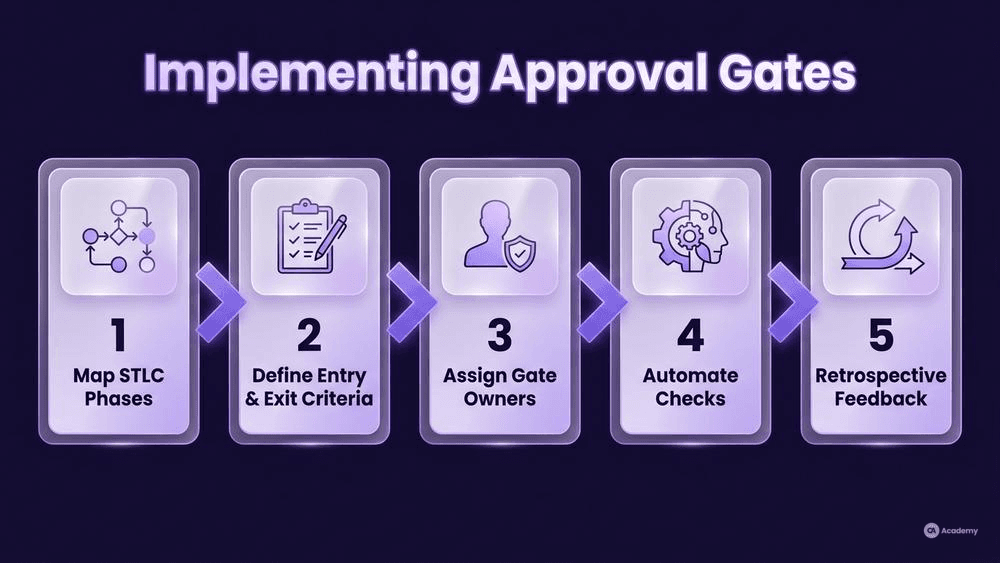
Step 1: Map Your Current STLC Phases
Before adding gates, document what you actually do — not what your process documentation says you do. Walk through your last three releases and identify:
- Where did handoffs occur?
- Who made the "go" decision, and based on what?
- Where did defects escape, and which missing checkpoint could have caught them?
Most teams discover they already have informal gates. The task is to formalize them.
Step 2: Define Entry and Exit Criteria for Each Gate
Each approval gate needs explicit, measurable criteria. Avoid vague requirements like "testing is complete." ISO/IEC/IEEE 29119-3 specifies that test completion reports should include an assessment of test results against exit criteria, providing a concrete template for what gate documentation should contain [5].
Here is a practical checklist template for a "Ready for System Testing" gate:
Entry Criteria:
- All unit tests pass in CI pipeline
- Integration test suite executes without critical failures
- Test environment provisioned and verified against configuration baseline
- Test data loaded and validated
- Test cases reviewed and mapped to requirements
Exit Criteria (for passing the gate):
- No unresolved critical or high-severity defects
- All mandatory test suites completed
- Risk-based assessment documented for any deferred medium-severity items
- Test summary report reviewed by test lead
Step 3: Assign Gate Owners
Every gate needs a single accountable owner — typically a test lead, QA manager, or release manager. This person does not make the decision alone but is responsible for convening the review, collecting evidence, and documenting the outcome.
In Scrum teams, the Sprint Review can function as a natural approval gate for feature completeness, while a separate "release readiness" gate before deployment ensures testing criteria are independently evaluated.
Step 4: Automate What You Can
Manual gates are necessary for judgment calls, but many entry criteria can be enforced automatically. Your CI/CD pipeline can block progression when:
- Any release-blocking or critical test fails
- A mandatory test suite does not complete
- Code coverage drops below the team's agreed threshold
- Security scan identifies vulnerabilities above an agreed severity level
The key principle is that automated gates enforce objective, binary criteria, while human gates handle risk-based judgment. Combining both gives you speed without sacrificing oversight.
Step 5: Establish a Feedback Loop
After each release, review your gate effectiveness. Ask:
- Did any defect escape that a gate should have caught?
- Did any gate block progress unnecessarily?
- Are criteria still relevant, or has the product evolved?
This retrospective approach ensures your gates remain calibrated — strict enough to catch real problems, flexible enough to avoid becoming bureaucratic obstacles.
Best Practices for Go/No-Go Decisions
Project milestone approvals work when they balance rigor with pragmatism. Here are practices that distinguish effective stage-gate reviews from checkbox exercises:
Make criteria risk-based, not fixed. Rather than mandating an arbitrary pass-rate percentage, define gates around risk: fail the gate if any release-blocking test fails, if a mandatory suite does not complete, or if the team's agreed threshold for a specific risk category is crossed. Remaining failures are triaged and consciously accepted by the release owner with documented rationale.
Time-box the review. Gate reviews that stretch into multi-hour debates lose their value. Set a 30-minute maximum. If the evidence does not clearly support "go," the answer is "no-go" until it does. This forces preparation quality up.
Separate the "what" from the "who." Gate criteria should be defined in advance during test planning — not invented during the review meeting. The ISTQB syllabus distinguishes between test planning (where exit criteria are defined) and test monitoring and control (where progress is evaluated against those criteria) [2]. Keeping these activities separate reduces bias.
Document decisions, not just outcomes. Record not only whether the gate passed or failed, but the reasoning. A "go with conditions" decision should list the conditions, the owner, and the deadline. This documentation becomes invaluable for post-release analysis and for regulated environments requiring traceability.
Involve cross-functional stakeholders. Effective go/no-go decisions include perspectives beyond QA: development leads confirm technical readiness, operations confirms deployment prerequisites, and product owners confirm scope alignment. The ISO/IEC 25010 product quality model provides a useful framework for ensuring that quality characteristics beyond functional correctness — such as performance efficiency, security, and reliability — are evaluated at gate reviews [6].
What NOT to Do with Approval Gates
Understanding anti-patterns is often as valuable as knowing best practices. Here are common mistakes that undermine gate effectiveness:
Do not create gates without authority. A gate that everyone can override without consequence is not a gate — it is a suggestion. If stakeholders routinely bypass gates under schedule pressure, the process erodes quickly. Ensure gate owners have explicit authority to block progression, and that this authority is backed by management.
Do not use gates as blame mechanisms. If a gate catches a problem, that is the system working as designed. Teams that punish the messenger — or the phase that triggered a "no-go" — train people to game the criteria rather than improve quality. Gates should feel like safety nets, not traps.
Do not duplicate criteria across gates. Each gate should evaluate criteria specific to its phase transition. If your "ready for integration testing" gate and your "ready for system testing" gate check the same things, one of them is redundant. Map each criterion to exactly one gate.
Do not skip retrospectives on gate performance. Gates that never evolve become stale. Requirements change, technology stacks shift, and team capabilities grow. A gate designed for a monolithic application may be entirely wrong for a microservices architecture. Review gate effectiveness at least quarterly.
Do not make every gate manual. In CI/CD environments, requiring human approval for every pipeline stage creates bottlenecks that negate the benefits of automation. Reserve human gates for decisions that genuinely require judgment — risk assessment, compliance sign-off, business readiness — and automate everything else.
Tools for Stage-Gate Reviews
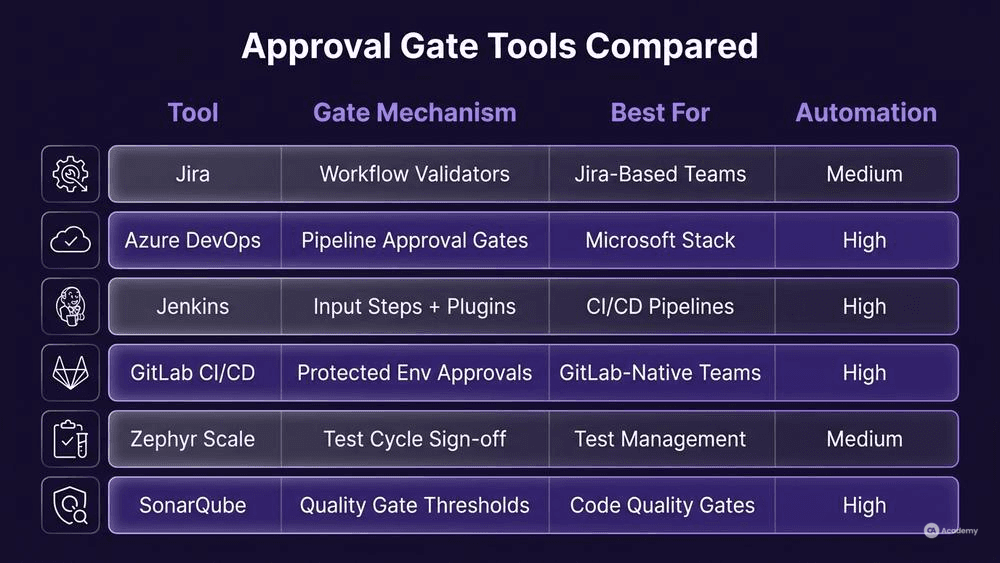
The right tooling makes gate management sustainable. Here is a comparison of tools commonly used for implementing approval gates in testing workflows:
Tool | Gate Mechanism | Best For | Automation Level |
|---|---|---|---|
Jira + Workflow Validators | Custom workflow transitions with required fields and conditions | Teams already using Jira for test management | Medium — enforces field-level criteria |
Azure DevOps | Release pipeline approval gates with pre/post-deployment conditions | Microsoft-stack teams needing integrated pipeline gates | High — supports automated checks plus manual approvals |
Jenkins | Pipeline | Teams with Jenkins-based CI/CD needing code quality gates | High — programmable via Jenkinsfile |
GitLab CI/CD | Manual job triggers and protected environment approvals | GitLab-native teams wanting gate controls in | High — native pipeline integration |
Zephyr Scale | Test cycle completion and exit criteria tracking | Dedicated test management with formal sign-off workflows | Medium — focused on test execution gates |
SonarQube | Quality Gate feature — blocks pipelines on code quality thresholds | Code-level quality gates (coverage, duplication, complexity) | High — fully automated, CI-integrated |
The TMMi (Test Maturity Model integration) framework provides a maturity-based perspective on how organizations can progressively improve their test process management, including the formalization of gate reviews as teams move from ad-hoc to managed and defined process levels [4].
Choosing your toolset: Start with whatever your team already uses. A well-configured Jira workflow with mandatory fields and transition conditions is more effective than a sophisticated gate management platform that nobody adopts. Add specialized tools as your process matures and as the overhead of manual tracking becomes unsustainable.
Real-World Example
⚠️ Disclaimer: The following scenario is an illustrative example based on typical industry patterns. The specific metrics are hypothetical estimates designed to demonstrate realistic outcomes, not measured data from a documented project. They should not be cited as factual benchmarks.
Context
A mid-size fintech company with eight Scrum teams releases a consumer banking application on a two-week sprint cadence. Their STLC included unit testing, integration testing, and manual regression, but no formal approval gates between phases.
Challenge
Production incidents were recurring after releases, often traced to issues that existed during testing but were not formally evaluated before deployment. The team had test results — but no structured mechanism to pause, review those results, and make an explicit go/no-go decision. Regulatory audit findings also flagged insufficient evidence of pre-release quality verification.
Solution
The QA leadership introduced three approval gates:
- Development-to-Testing Gate: Automated — CI pipeline blocks test execution if any build-verification test fails or if static analysis identifies critical issues.
- Testing-to-Staging Gate: Hybrid — automated criteria (all critical and high-priority test suites pass, no unresolved critical defects) plus manual review by the test lead, who evaluates risk-based test coverage and deferred defect rationale.
- Staging-to-Production Gate: Manual — release manager convenes a 20-minute review with QA lead, dev lead, and operations. Checklist includes: regression suite completion, performance test results within defined thresholds, security scan clearance, and rollback plan verification.
Results
After two quarters of operation with the gate framework:
- Production incidents attributable to insufficient testing dropped by approximately 65%
- The average time spent on post-release hotfixes decreased by roughly 50%
- Regulatory audit findings related to quality evidence were eliminated
- Sprint velocity initially dipped by about 5% as teams adapted to gate requirements, then recovered as criteria became routine
Key Takeaways
- The highest-value gate was the hybrid testing-to-staging checkpoint, which caught the majority of issues that previously escaped to production.
- Automating the first gate removed friction while still enforcing baseline quality.
- The manual production gate took less than 20 minutes per release once templates and checklists were established.
- Initial team resistance faded within one quarter as teams saw fewer weekend incident calls.