



You have a single input field that accepts values from 1 to 10,000. Testing every possible value would take weeks. Testing five values chosen randomly gives you zero confidence. Equivalence partitioning solves this problem by dividing the input domain into groups where each value is expected to produce the same behavior — so you test one representative from each group and move on. This black-box technique is one of the most practical tools in a QA tester's arsenal, yet many teams apply it inconsistently or incompletely. In this article, you will learn how to identify valid and invalid partitions, design minimal but effective test suites, avoid common mistakes, and integrate equivalence partitioning into your daily workflow — including how it supports test automation.
What Is Equivalence Partitioning?
Equivalence partitioning (EP) is a black-box test design technique that divides the input domain of a system into groups — called equivalence partitions — where every value within a group is expected to trigger the same system behavior [1], [2]. Instead of testing hundreds or thousands of individual inputs, you select one representative value from each partition and use it as your test case.
The ISTQB Foundation Level syllabus defines equivalence partitioning as a technique where "equivalence partitions are identified such that every element of a partition is expected to be processed in the same way by the test object" [1]. ISO/IEC/IEEE 29119-4 formalizes this further as a systematic coverage-based technique for deriving test cases from identified partitions [2].
Why It Matters for QA
The core assumption behind EP is straightforward: if one value from a partition reveals a defect, any other value from that same partition should also reveal it. Conversely, if one value passes, the others are expected to pass as well. This assumption is what makes test case reduction possible without sacrificing meaningful coverage.
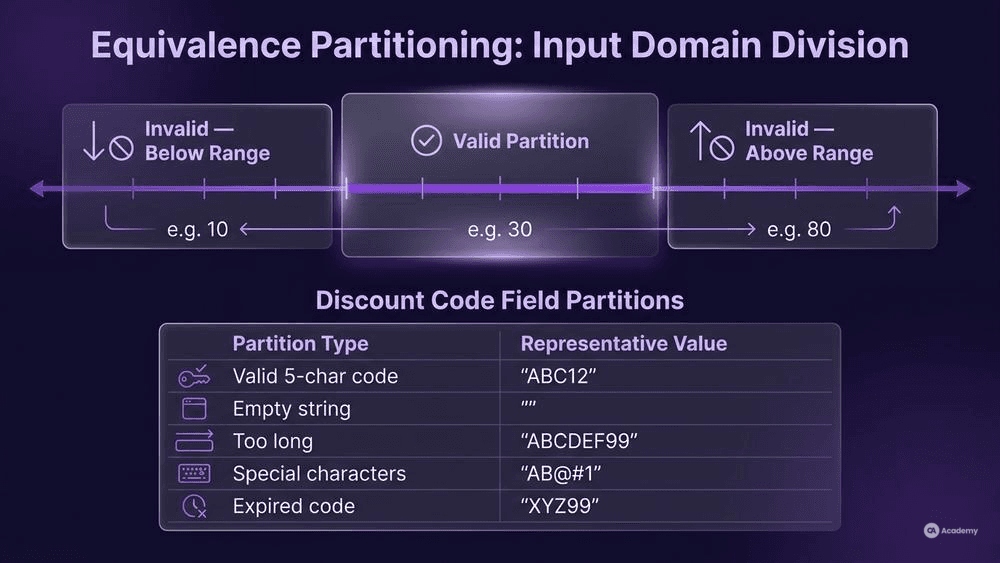
Consider a registration form with an age field accepting values 18–65. Without EP, you might feel compelled to test dozens of values. With EP, you identify three partitions:
- Valid partition: 18–65 (one test case, e.g., 30)
- Invalid partition (below range): values less than 18 (one test case, e.g., 10)
- Invalid partition (above range): values greater than 65 (one test case, e.g., 80)
Three test cases instead of dozens. That is the power of systematic input domain division.
EP matters because every unnecessary test case costs design time, execution time, and maintenance effort — resources that could go toward higher-risk areas your team has not yet explored. When applied correctly, EP lets you allocate testing effort where it delivers the most value.
How to Create Equivalence Partition Tests
Building effective equivalence partition tests follows a repeatable process. Here is a step-by-step guide you can apply to virtually any input.
Prerequisites and Setup
Before you start partitioning, you need:
- Clear requirements or specifications for the input being tested (acceptable ranges, data types, business rules)
- Access to the system or a reliable prototype to verify expected behavior
- A test design template or tool where you will document your partitions and test cases
If your requirements are ambiguous, resolve that ambiguity first. Partitioning against vague specifications produces partitions that may not reflect actual system behavior.
Step 1: Identify All Input Variables
List every input the system accepts. This includes form fields, API parameters, file uploads, configuration settings, and environmental conditions. Do not limit yourself to obvious text fields — dropdown selections, toggles, and multi-value inputs all qualify.
Step 2: Divide Each Input into Valid and Invalid Partitions
For each input variable, determine which values the system should accept (valid partitions) and which it should reject (invalid partitions). A single input often produces multiple partitions on both sides.
Example — a discount code field:
Partition | Type | Representative Value |
|---|---|---|
Valid 5-character alphanumeric code | Valid | "ABC12" |
Empty string | Invalid | "" |
Code longer than 5 characters | Invalid | "ABCDEF99" |
Code with special characters | Invalid | "AB@#1" |
Expired but correctly formatted code | Invalid | "XYZ99" |
Notice that "invalid" is not a single bucket. Each distinct reason for rejection should typically get its own partition because the system may handle each differently [1].
Step 3: Select One Representative Value per Partition
Choose a single value from each partition. The specific value usually does not matter — what matters is that it sits clearly within the partition, not at its edge. Boundary values are handled by a complementary technique (boundary value analysis), which pairs naturally with EP [1].
Step 4: Design Test Cases
Create one test case per partition. Each test case should specify:
- The input value (your representative)
- The expected result (accept, reject, specific error message, etc.)
- Any preconditions or dependencies
Step 5: Review for Completeness
Check that you have covered every identified partition. A common gap is missing the "no input" or "null" partition — users skip fields more often than you might expect. Also verify that you have not combined multiple invalid partitions into a single test case; each invalid partition should ideally be tested in isolation to pinpoint which condition triggers which behavior [1].
Common Pitfalls and What Not to Do
Equivalence partitioning looks simple on the surface, which is exactly why teams apply it incorrectly. Here are the mistakes that undermine your test design.
Treating all invalid values as one partition. A field that rejects negative numbers, non-numeric input, and values exceeding a maximum has three distinct invalid partitions, not one. Lumping them together means you test one and miss defects in the other two.
Ignoring non-obvious partitions. Null values, empty strings, whitespace-only input, Unicode characters, and maximum-length strings often get overlooked. These are real partitions that real users trigger — especially in internationalized applications.
Confusing EP with boundary value analysis. EP and boundary value analysis are complementary, not interchangeable. EP selects a representative from the middle of each partition; boundary value analysis focuses on the edges. Use both together, but do not assume one replaces the other [1].
Over-partitioning stable ranges. If a continuous valid range (e.g., 1–100) truly behaves uniformly, splitting it into sub-ranges (1–25, 26–50, 51–75, 76–100) without a behavioral reason adds test cases that provide no additional defect detection. Partition based on behavior differences, not arbitrary divisions.
Skipping partition documentation. When partitions exist only in the tester's head, they cannot be reviewed, maintained, or reused. Document your partitions explicitly — this also makes them available for test automation, where parameterized tests can iterate through representative values programmatically.
Best Practices for Effective Input Domain Division
These practices separate a basic application of EP from one that consistently delivers results.
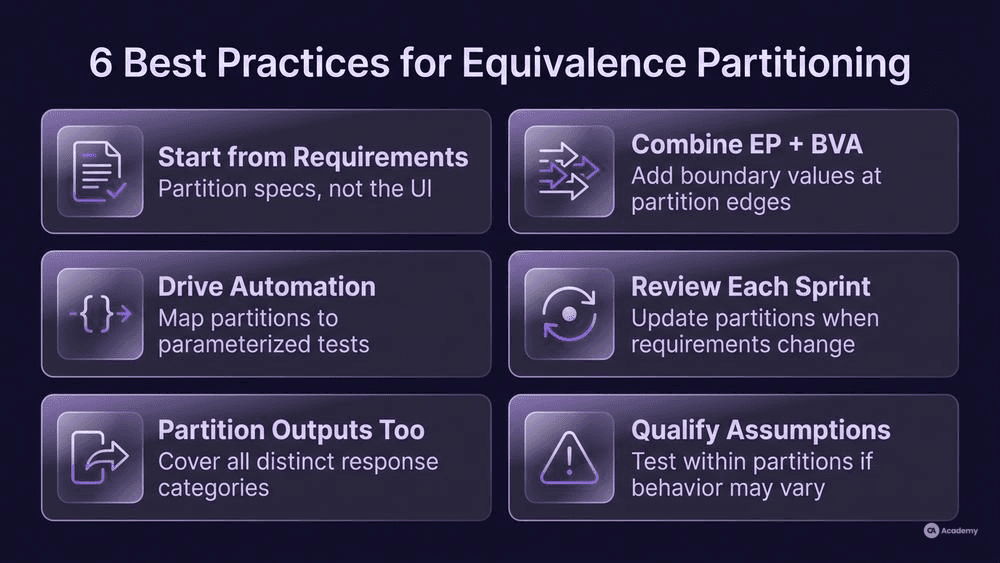
Start from requirements, not from the UI. The interface might constrain inputs (e.g., a dropdown), but the underlying API may not. Partitioning based on the specification catches defects that UI-only testing misses.
Combine EP with boundary value analysis systematically. After identifying your partitions, add boundary values at the edges of each partition. This layered approach provides both breadth (EP) and precision (BVA) [1], [2].
Use equivalence partitioning to drive test automation. Once you have documented your partitions and representative values, they map directly to parameterized test cases in frameworks like pytest, JUnit, or TestNG. Each partition becomes a data row in a data-driven test, which means your EP analysis feeds automation without extra translation effort.
Review partitions during sprint refinement. When requirements change, partitions change. Make partition review part of your definition of ready for testing — not an afterthought after development is complete.
Apply EP to outputs, not just inputs. Most teams partition inputs exclusively, but you can also partition expected outputs. If a system produces five distinct response categories, ensure your test suite covers at least one input that triggers each output category.
Qualify your assumptions. The fundamental EP assumption — that all values within a partition are expected to behave identically — is a design hypothesis, not a guarantee. If you suspect the implementation may treat certain in-partition values differently (e.g., due to rounding, caching, or locale-specific logic), add targeted tests within that partition. The assumption is a starting point, not an absolute rule.
Tools Comparison
You do not need specialized software to apply equivalence partitioning, but several tools support or accelerate the process.
Tool | EP Support | Best For | Notes |
|---|---|---|---|
TestLink | Manual partition documentation | Teams using structured manual test management | Open source; partitions documented as test case attributes |
PractiTest | Built-in test design fields | Teams needing traceability from partition to execution | Commercial; supports linking partitions to requirements |
qTest | Test design with parameterization | Enterprise teams integrating EP with CI/CD | Commercial; supports data-driven test design |
Zephyr Scale | Test case parameterization | Jira-native teams automating test data | Integrates directly with Jira; supports parameterized cases |
Spreadsheets (Excel/Sheets) | Full manual control | Small teams or ad-hoc analysis | Zero cost; no automation integration |
pytest / JUnit / TestNG | Parameterized tests from partition data | SDETs building automated suites from EP analysis | Map each partition to a parameter set; highly scalable |
For most QA teams, the practical choice comes down to: document partitions in your test management tool, then export representative values to your automation framework as parameterized test data. The tool matters less than the discipline of documenting and maintaining your partitions.
Real-World Example
⚠️ Disclaimer: The following scenario is an illustrative example based on typical industry patterns. The specific metrics are hypothetical estimates designed to demonstrate realistic outcomes, not measured data from a documented project. They should not be cited as factual benchmarks.
Context
A mid-sized fintech team manages a loan eligibility API that accepts four input parameters: applicant age (18–70), annual income (currency value), credit score (300–850), and loan term (12, 24, 36, 48, or 60 months). The API returns one of three outcomes: approved, conditionally approved, or rejected.
Challenge
The team's existing test suite contained over 400 manually written test cases for this single endpoint. Many test cases overlapped — multiple cases tested income values of $50,000, $55,000, and $60,000, all falling within the same behavioral range. Sprint regression took two full days, and the team still found production defects in edge conditions they had never covered.
Solution
The team applied equivalence partitioning systematically across all four parameters:
- Age: Three partitions (below 18, 18–70, above 70)
- Income: Four partitions (zero/negative, below minimum threshold, within eligible range, above high-earner threshold)
- Credit score: Four partitions (below 300, 300–579 poor, 580–739 fair, 740–850 good)
- Loan term: Two partitions (valid terms from the enumerated list, invalid terms not in the list)
They then layered boundary value analysis on each partition edge. The combined approach produced 52 focused test cases — each traceable to a specific partition.
The team converted these 52 cases into parameterized tests in pytest, where each partition's representative value became a row in a test data fixture. This made the EP analysis directly executable in their CI pipeline.
Results
- Test case reduction: The suite shrank from over 400 cases to 52, a roughly 87% reduction in test count.
- Regression execution time: Dropped from approximately two days of manual execution to under half a day of automated runs.
- Defect detection: The team identified three previously undetected boundary defects during the initial EP analysis — conditions that the original 400 cases had never covered.
- Maintenance effort: Fewer, well-documented cases meant the team spent less time updating tests when requirements shifted.
Key Takeaways
- Volume of test cases does not equal quality of test coverage. Structured partitioning exposed gaps that a larger, unstructured suite had missed.
- Converting EP analysis directly into parameterized automated tests eliminated the gap between test design and test execution.
- Layering boundary value analysis onto equivalence partitions provided both breadth and edge-case precision.