



Security defects routinely slip past functional test suites that were never designed to catch them. Your Selenium scripts confirm that a login form works. They do not confirm that the same form resists SQL injection. Penetration testing closes that gap by simulating real attacks against your application before an adversary does it for you. This article gives you a concrete workflow for integrating penetration testing into your QA process. You will get a methodology comparison, a tool-selection framework, and a step-by-step engagement checklist. Whether you run a web application pentest or scope a full network infrastructure audit, the playbook below is built for testers, not security consultants.
What Is Penetration Testing?
Penetration testing is a controlled, authorized attempt to exploit vulnerabilities in a system, network, or application. The goal is to identify security weaknesses that an attacker could leverage — before they actually do. Unlike a vulnerability assessment report, which catalogues potential issues, a pentest goes further: it attempts exploitation, measures impact, and provides evidence of what an attacker could achieve.
The ISTQB glossary defines testing broadly as "the process consisting of all lifecycle activities, both static and dynamic, concerned with planning, preparation and evaluation of a component or system and related work products" [1]. Penetration testing is a specialized, dynamic form of this process focused squarely on security attributes.
Why It Matters for QA
QA owns the quality gate. If your Definition of Done covers functional correctness and performance but ignores security, you are shipping risk. The OWASP Top 10:2025 identifies injection flaws, broken access control, and security misconfiguration as persistent, high-impact web application security risks [2]. These are not exotic threats — they appear in routine CRUD applications, admin panels, and API endpoints your team tests every sprint.
ISO/IEC 25010:2023 explicitly includes "security" as a product quality characteristic, encompassing confidentiality, integrity, non-repudiation, accountability, and authenticity [3]. When QA teams ignore penetration testing, they leave an entire quality dimension uncovered. A red team engagement or even a lightweight pentest surfaces defects that no amount of functional automation will catch.
Evaluating Methodologies: OSSTMM vs OWASP PTES
Choosing a methodology is not a formality — it shapes scope, deliverables, and how findings map to your defect-tracking system. Here is a critical comparison to help you decide which fits your context.
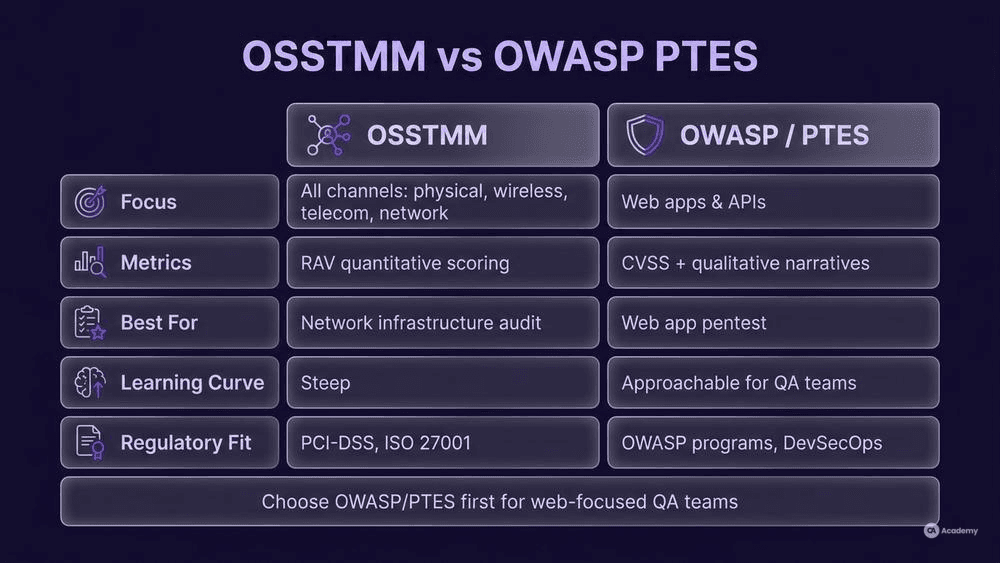
Criterion | OSSTMM | OWASP Testing Guide / PTES |
|---|---|---|
Focus | Operational security across all channels (human, physical, wireless, telecom, data networks) | Web application and software-centric testing |
Metric system | RAV (Risk Assessment Values) — quantitative | CVSS-based severity + qualitative narratives |
Best for | Network infrastructure audit, compliance-driven engagements | Web application pentest, API security testing |
Learning curve | Steeper — requires understanding channel taxonomy | More approachable for QA teams already familiar with web tech |
Regulatory fit | Strong for PCI-DSS, ISO 27001 contexts | Strong for OWASP-aligned programs, DevSecOps pipelines |
When to choose OSSTMM: Your pentest scope extends beyond the application layer — network segments, wireless, or physical security controls need evaluation.
When to choose OWASP/PTES: Your team primarily tests web applications and APIs, and you want findings that map directly to OWASP Top 10 categories [2]. Most QA teams start here.
When to combine both: Mature security programs sometimes layer OSSTMM's quantitative RAV scoring on top of OWASP's technical test cases. This hybrid approach works well for organizations that need both compliance metrics and actionable developer-facing defect reports.
How to Conduct a Penetration Test from a QA Workflow
This section gives you a step-by-step engagement flow designed for QA teams operating inside Scrum or Kanban. Adapt timings to your sprint cadence.
Prerequisites and Setup
- Written authorization: Obtain explicit written approval from the system owner before any pentest activity. Without it, you risk legal consequences — even against a staging environment. Frame this as a best practice that protects both the tester and the organization.
- Scope document: Define target URLs, IP ranges, API endpoints, and out-of-scope systems. Be specific — "the staging environment" is not a scope; "staging.app.example.com, ports 80/443, REST API v2 endpoints" is.
- Environment: Use a dedicated staging or pre-production environment. Never pentest production without explicit, documented risk acceptance from stakeholders.
- Credentials: Prepare at least two account tiers (standard user, admin) for authenticated testing.
Step 1 — Reconnaissance
Gather information about the target. Use passive techniques first (DNS lookups, WHOIS, certificate transparency logs), then active scanning (port scans, service enumeration). Document every finding in your test management tool — treat recon outputs as test artifacts.
Step 2 — Vulnerability Identification
Run automated scanners (see Tools Comparison below) and manually inspect results. Map findings to OWASP Top 10:2025 categories [2]. Log each finding as a defect with CVSS severity scoring.
Step 3 — Exploitation
Attempt to exploit confirmed vulnerabilities. This is where a pentest diverges from a vulnerability assessment report: you are proving impact, not just listing possibilities. For each successful exploit, document the attack path, the data or access obtained, and the business impact.
Step 4 — Post-Exploitation and Lateral Movement
If scope permits, determine what an attacker could do after initial compromise. Can they pivot to other systems? Escalate privileges? Access sensitive data stores? This step is essential for a red team engagement but may be reduced in scope for a sprint-level pentest.
Step 5 — Reporting and Remediation Handoff
Write an exploitation narrative for each critical finding — not just a scanner output dump. Include: vulnerability description, reproduction steps, evidence (screenshots, request/response logs), CVSS score, and a recommended fix. File these as defects in Jira, Azure DevOps, or your team's tracker. Assign to the owning developer and include the finding in your sprint review.
Common Pitfalls
- Scanner-only pentests: Running OWASP ZAP and calling it a pentest is a vulnerability scan, not a penetration test. Manual verification and exploitation are what make a pentest valuable.
- Scope creep: Without a tight scope document, testers drift into production systems or third-party integrations. This creates legal and operational risk.
- Report-and-forget: A pentest finding that sits in a backlog without remediation tracking provides zero security value. Treat pentest defects with the same discipline as functional blockers.
Tools Comparison
Every tool below is real, actively maintained, and verifiable at the listed URL.
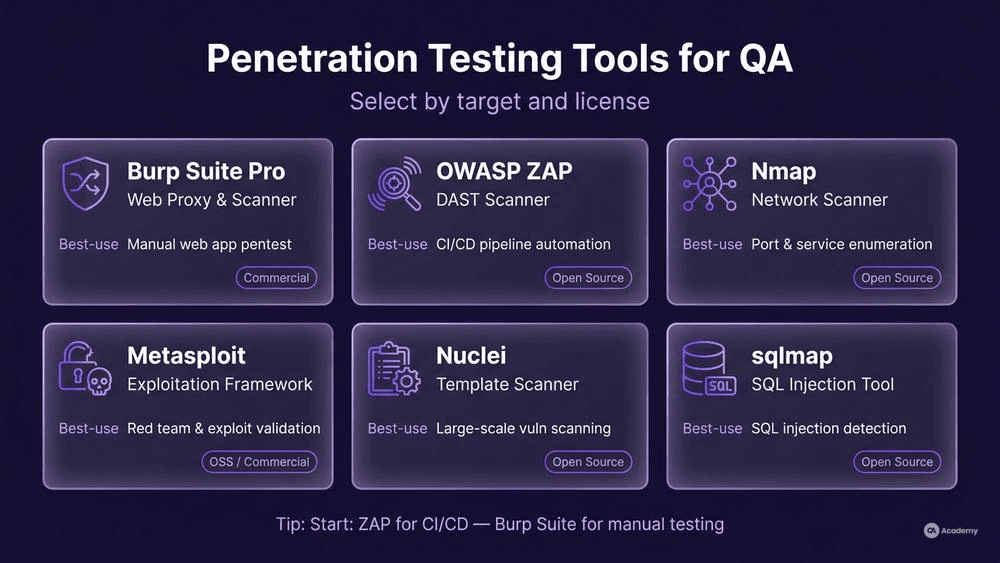
Tool | Type | Best For | License | Official URL |
|---|---|---|---|---|
Burp Suite Professional | Web app proxy & scanner | Web application pentest, API security testing | Commercial | https://portswigger.net/burp |
OWASP ZAP | Web app scanner | Automated DAST in CI/CD pipelines | Open Source | https://www.zaproxy.org/ |
Nmap | Network scanner | Network infrastructure audit, port/service enumeration | Open Source | https://nmap.org/ |
Metasploit Framework | Exploitation framework | Red team engagement, exploit validation | Open Source (Community) / Commercial (Pro) | https://www.metasploit.com/ |
Nuclei | Template-based scanner | Fast, large-scale vulnerability scanning with community templates | Open Source | https://github.com/projectdiscovery/nuclei |
sqlmap | SQL injection tool | Automated SQL injection detection and exploitation | Open Source | https://sqlmap.org/ |
Selection criteria for QA teams: If your primary target is a web application or REST API, start with OWASP ZAP for automated scanning in your CI pipeline, then use Burp Suite for manual exploration and API security testing. Add Nmap when your scope includes network-layer assessment.
Best Practices — and What Not to Do
Do
- Integrate pentest cadence with release cycles. Run a lightweight pentest (focused on new features and changed endpoints) every release. Schedule a full-scope engagement quarterly or before major launches.
- Map findings to standards. Tag each defect with its OWASP Top 10:2025 category [2] and its ISO/IEC 25010:2023 quality sub-characteristic (e.g., confidentiality, integrity) [3]. This gives stakeholders a shared language.
- Automate the repeatable parts. DAST scans (ZAP, Nuclei) belong in your CI/CD pipeline. Manual exploitation and business-logic testing are the parts that require human judgment.
- Build a security regression suite. Every confirmed pentest finding becomes a regression test case. When the developer patches it, your automation confirms the fix and catches regressions in future sprints.
What Not to Do
- Do not treat a vulnerability scan as a penetration test. Scanners identify potential issues. Pentests prove exploitability. Conflating the two gives stakeholders a false sense of security.
- Do not pentest without a defined remediation owner. If nobody is accountable for fixing findings, the engagement produces a PDF, not security improvement.
- Do not skip business-logic testing. Automated scanners are largely blind to authorization bypass, workflow manipulation, and race conditions. These require manual testing with domain knowledge — exactly the kind QA teams already possess.
- Do not assume staging mirrors production security posture. Configuration differences (TLS settings, WAF rules, network segmentation) mean staging findings may not fully represent production risk. Document assumptions explicitly.
Real-World Example
⚠️ Disclaimer: The following scenario is an illustrative example based on typical industry patterns. The specific metrics are hypothetical estimates designed to demonstrate realistic outcomes, not measured data from a documented project. They should not be cited as factual benchmarks.
Context
A mid-sized fintech company runs a customer-facing web application with REST API endpoints handling payment processing. The QA team of six testers owns functional and performance testing but has no formal security testing process. Security reviews happen only during annual third-party audits.
Challenge
The annual audit consistently surfaces the same categories of findings: broken access control, injection flaws, and security misconfiguration — all OWASP Top 10:2025 categories [2]. Remediation happens in a post-audit rush, delaying feature delivery. The team realizes that catching these issues earlier would reduce both risk and rework cost.
Solution
The QA lead introduced a three-tier penetration testing approach:
- Pipeline-level DAST: OWASP ZAP integrated into the CI/CD pipeline, running on every deploy to staging. Scans target new and modified endpoints automatically.
- Sprint-level manual pentest: One tester with ISTQB Foundation-level knowledge [4] and additional security training runs a focused manual pentest each sprint, concentrating on new features, authentication flows, and API security testing scenarios.
- Quarterly full-scope engagement: A structured pentest covering the full application surface, following OWASP Testing Guide methodology, with findings mapped to ISO/IEC 25010:2023 security sub-characteristics [3].
Results (Illustrative)
- Security defects identified pre-release increased from roughly 15% to approximately 70% of total security findings.
- Remediation cycle time dropped from an estimated 6 weeks (post-audit) to approximately 1.5 sprints (in-flow).
- The annual audit finding count decreased by an estimated 65%.
- Developer rework effort for security issues reduced by roughly 55%, as defects were caught closer to the point of introduction.
Key Takeaways
- Start small. Automated DAST in the pipeline is the lowest-effort, highest-return first step.
- Grow incrementally. Sprint-level manual pentests build security muscle within the QA team without requiring dedicated security hires.
- Map to standards. Tagging findings with OWASP categories and ISO quality characteristics gave stakeholders a shared vocabulary and made prioritization easier.
- Measure the shift. Tracking the ratio of pre-release vs. post-audit findings demonstrated ROI and justified continued investment.