



You spent thirty minutes writing a prompt asking an LLM to generate test cases for a payment form. The output looked impressive — until you realized it missed every negative scenario, ignored boundary values, and hallucinated an API endpoint that does not exist. The problem was not the model. It was the prompt. Prompt engineering is the discipline of structuring instructions so that large language models return useful, accurate, and testable outputs. For QA professionals, mastering this skill is becoming a core competency. This article gives you concrete patterns, workflows, and a comparison of tools so you can start generating better test artifacts immediately.
What Is Prompt Engineering?
Prompt engineering is the practice of designing, structuring, and iterating on the textual instructions you send to a large language model (LLM) to control the quality, format, and relevance of its output. It sits at the intersection of AI query formulation and test design — you are essentially writing a specification for a machine that generates text.
In software testing, the concept maps directly to practices you already know. Just as a well-written test case has preconditions, steps, and expected results, a well-engineered prompt has context, instructions, and output constraints. The ISO/IEC/IEEE 29119-3 standard defines test documentation templates that emphasize clarity, completeness, and traceability [1]. The same principles apply when you write instructions for an LLM.
Why It Matters for QA
Three forces are converging. First, LLMs can now generate syntactically valid test cases, test data, and even draft automation scripts. Second, the quality of that output varies wildly depending on how you phrase your request. Third, QA teams are under constant pressure to cover more ground with the same headcount.
If you treat an LLM like a search engine — typing a vague question and hoping for the best — you get vague, generic output. If you treat it like a junior tester who needs a precise brief, you get output that is closer to production-ready. The difference is prompt engineering.
This is not about replacing testers. It is about giving you a tool that handles the repetitive generation work so you can focus on exploratory testing, risk analysis, and the judgment calls that require human expertise.
How to Build Effective QA Prompts
This section walks you through a repeatable workflow. Think of it as a standard operating procedure for interacting with LLMs during test design.
Prerequisites and Setup
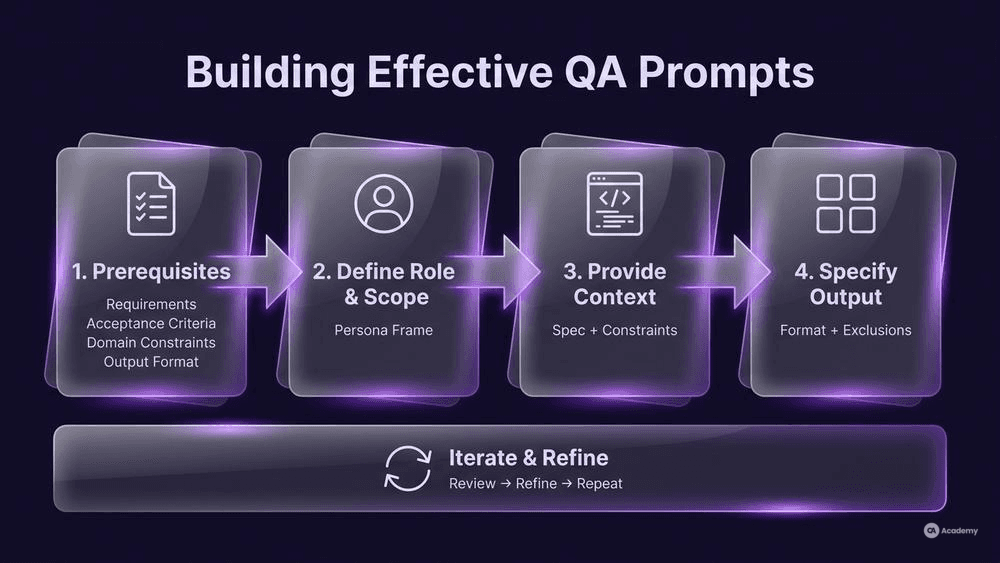
Before you write your first prompt, gather these inputs:
- Requirements or user stories — the feature specification you are testing against.
- Acceptance criteria — the conditions that define "done" for each story.
- Domain constraints — business rules, regulatory requirements, data formats.
- Target output format — do you want a table, Gherkin steps, xUnit code, or free-text scenarios?
Having these ready is not optional. Context is one of the most significant factors in prompt quality. An LLM without context is guessing; an LLM with context is generating from a constrained problem space.
Step 1: Define the Role and Scope
Start your prompt by telling the model who it is and what domain it is operating in. This is sometimes called a "system message" or "persona frame."
` You are a senior QA engineer specializing in payment systems. You follow ISTQB terminology and ISO/IEC/IEEE 29119 test documentation standards. `
This narrows the model's response distribution. Without it, the LLM draws from its entire training corpus, which includes everything from cooking recipes to legal briefs. With it, you are steering model response shaping toward testing vocabulary and structures.
Step 2: Provide Context (the Specification)
Paste or summarize the relevant requirement. Be explicit about what the system under test does, its inputs, its outputs, and its constraints.
` Feature: Credit card payment form Inputs: card number (16 digits, Luhn-valid), expiry date (MM/YY, must be future), CVV (3 digits), amount (0.01–9999.99 USD) Business rule: Decline if amount > daily limit set in user profile. `
This step is directly related to context window management. Every LLM has a finite context window — the maximum number of tokens it can process in a single interaction. If your specification is long, prioritize the sections most relevant to the test scope. Strip out boilerplate, navigation descriptions, and non-functional requirements that are irrelevant to the current test objective.
Step 3: Specify the Output Format and Constraints
Tell the model exactly what you want back. Ambiguity here is where most QA prompts fail.
` Generate a test case table with columns: ID | Test Scenario | Input Data | Expected Result | Priority (High/Medium/Low)
Include:
- Positive cases for each input field
- Boundary values for amount and expiry date
- Negative cases: invalid card number, expired date, CVV too short/long, amount out of range
- At least one case for the daily limit business rule
Do NOT include performance or security test cases. `
The explicit "Do NOT" instruction is critical. LLMs tend to over-generate. Telling the model what to exclude is often more effective than only telling it what to include.
Step 4: Iterate and Refine
Your first prompt rarely produces perfect output. Review what the model returns against the ISO/IEC/IEEE 29119-4 standard's test techniques — specifically equivalence partitioning and boundary value analysis [2] — and check whether the output covers the partitions you would have identified manually.
If the model missed a class of inputs, add a follow-up prompt:
` You missed the scenario where the card number passes Luhn validation but belongs to an unsupported card network (e.g., Diners Club). Add two test cases for unsupported card types. `
This iterative loop — generate, review, refine — is the core of LLM instruction tuning in practice.
Common Pitfalls
- Overloading a single prompt. Asking for functional, performance, security, and accessibility test cases in one prompt degrades quality across all categories. Split by test type.
- Ignoring the output. LLM-generated test cases require human review. Treat them as drafts, not finished artifacts. The ISTQB Foundation Level syllabus emphasizes that test design is an intellectual activity requiring analysis and judgment [3].
- Assuming determinism. The same prompt can produce different outputs on different runs. If you need reproducible results, set the model temperature to 0 (or as low as the tool allows) and save your prompts in version control.
Best Practices for Prompt Design Patterns
Two patterns work particularly well for QA use cases. They give you a reusable structure — a template you can adapt across projects.
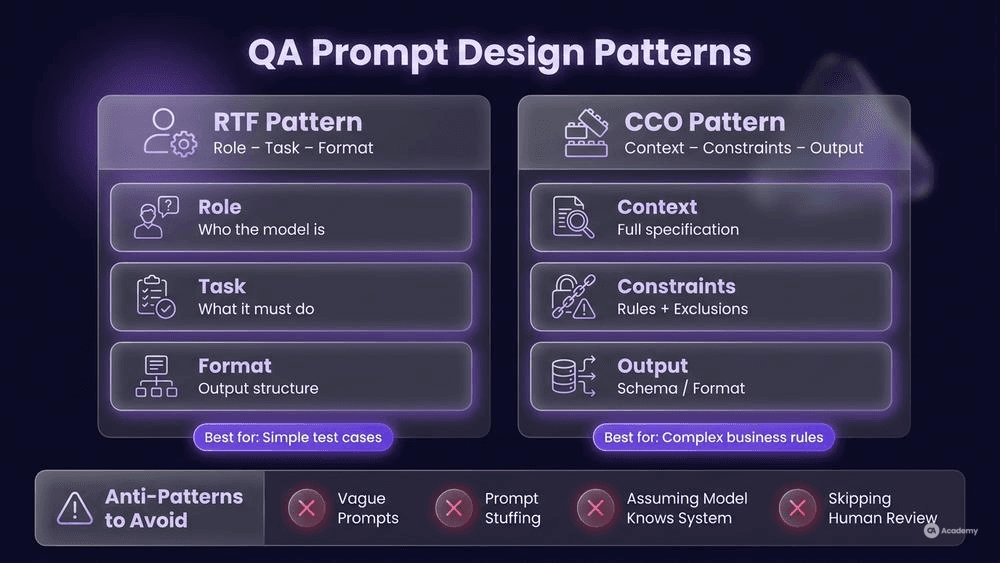
Pattern 1: RTF (Role–Task–Format)
This is the simplest effective pattern. You define the role (who the model is), the task (what it should do), and the format (how to structure the output).
` Role: Senior test analyst for an e-commerce platform. Task: Generate boundary value test cases for the "quantity" field on the product order page. Valid range: 1–99. Format: Gherkin (Given/When/Then), one scenario per boundary value. `
RTF works well for straightforward test case generation where the domain context is minimal.
Pattern 2: CCO (Context–Constraints–Output)
CCO is better for complex scenarios where business rules interact. You provide rich context, set explicit constraints, and define the output schema.
` Context: User registration form for a healthcare app. Fields: email, password (min 12 chars, must include uppercase, lowercase, digit, special char), date of birth (must be 18+ years), insurance ID (format: 3 letters + 9 digits). Constraints: Cover equivalence classes for each field. Include at least 3 negative cases per field. Do NOT generate test data that could match real patient identifiers. Format: Markdown table — ID | Field | Equivalence Class | Input | Expected Result `
The key difference is the constraints block. This is where you embed the domain knowledge that prevents the LLM from generating plausible but incorrect output.
What NOT to Do
Avoid these anti-patterns — they consistently produce poor results:
- Vague prompts: "Generate some test cases for login." This gives the model no specification to work from.
- Prompt stuffing: Cramming every keyword and requirement into a single block of text. The model loses focus.
- Assuming the model knows your system: LLMs do not have access to your codebase, your Jira board, or your test environment unless you provide that information explicitly.
- Skipping human review: Never push LLM-generated test cases into your test management system without a tester reviewing them for accuracy, relevance, and completeness. The ISO/IEC/IEEE 29119-2 standard's test design process requires analysis of the test basis as a human-driven activity [4].
Tools Comparison
The table below compares tools commonly used for prompt-driven test generation. Each tool listed is real and publicly available.
Tool | Primary Use Case | Prompt Interface | QA-Specific Features | Pricing Model |
|---|---|---|---|---|
ChatGPT (OpenAI) | General test case generation, test data creation | Chat + API | Custom GPTs for test templates | Freemium / API pay-per-token |
GitHub Copilot | Test automation code generation | IDE-integrated | Inline suggestions for test methods | Subscription |
Amazon Q Developer | AWS-integrated test generation | IDE + CLI | Unit test generation for Java/Python | Free tier + Pro |
Gemini (Google) | Test scenario brainstorming, doc analysis | Chat + API | Large context window for spec analysis | Freemium / API pay-per-token |
Tabnine | Code completion for test scripts | IDE-integrated | Context-aware completions from local codebase | Freemium / Enterprise |
How to choose: If your primary goal is generating test case tables from specifications, ChatGPT or Gemini with a well-structured CCO prompt gives you the most flexibility. If you are writing automation code and want in-editor suggestions, GitHub Copilot or Tabnine integrate directly into your workflow.
No single tool excels at every QA task. Evaluate based on your team's most time-consuming activity — if it is test design, prioritize tools with large context windows that can ingest full specifications. If it is writing automation boilerplate, prioritize IDE integration.
Real-world Example
⚠️ Disclaimer: The following scenario is an illustrative example based on typical industry patterns. The specific metrics are hypothetical estimates designed to demonstrate realistic outcomes, not measured data from a documented project. They should not be cited as factual benchmarks.
Context
A mid-sized fintech team (4 testers, 12 developers) needed to generate test cases for a new multi-currency transfer feature. The feature had 14 input fields, 6 business rules involving currency conversion thresholds, and regulatory constraints from two jurisdictions.
Challenge
Manually writing test cases for this feature typically consumed 3–4 days of a senior tester's time. The team was running two-week sprints, so test design alone could consume up to 40% of available testing time. Coverage of negative and boundary scenarios was inconsistent because testers understandably prioritized the happy path under time pressure.
Solution
The team adopted a structured prompt engineering workflow:
- Created a prompt template library — RTF templates for simple fields, CCO templates for fields with interacting business rules.
- Established a review protocol — every LLM-generated test case set was reviewed against the equivalence partitions and boundary values the tester identified manually before prompting. This ensured the model supplemented human analysis rather than replacing it.
- Versioned prompts in Git — prompts were stored alongside test plans, making them reviewable and auditable.
- Set temperature to 0 for deterministic output during formal test design; used higher temperature during exploratory brainstorming sessions.
Results (Illustrative Estimates)
- Test design time reduced from approximately 3–4 days to approximately 1–1.5 days per feature — an estimated efficiency gain of roughly 55–65%.
- The team observed approximately 50% more boundary and negative scenarios in their generated sets compared to their previous manual-only approach, based on internal scenario counts.
- Prompt templates became reusable across similar features, further reducing setup time for subsequent sprints.
These estimates reflect the type of improvement commonly discussed in practitioner communities and are plausible for a team adopting structured prompt workflows for the first time. However, actual results depend on feature complexity, team maturity, model selection, and the quality of the prompt templates used.
Key Takeaways
- Prompts are test artifacts. Version them, review them, and maintain them like you would test plans.
- Human review is non-negotiable. The LLM generates candidates; the tester validates them against the specification and their own domain knowledge.
- Start with one feature. Do not try to roll out prompt-driven test generation across your entire project at once. Pilot on a single feature, measure the results, and iterate.